.avif)

📌 Key Takeaways:
Turn chaotic amenity requests into a governed, self-serve system that lifts utilization and protects the luxury standard.
Automate the Booking Rules: Encode eligibility, per-unit caps, buffers, blackout windows, pricing windows, and no-show policies to convert demand into realized usage with less administrative work.
Make Policies Visible in the Resident App: Publish clear labels, FAQs, and rules where residents book to set expectations and reduce disputes.
Design Slots Around Reality: Set slot lengths and buffers that match actual usage and cleaning needs, then tune for peak and off-peak demand.
Enforce and Release: Apply fair cancellation and no-show rules with waitlist auto-release to free idle capacity and improve reliability.
Monitor, Iterate, and Prove NOI: Track utilization, no-show rates, and peak overflow monthly or seasonally to guide adjustments and support reinvestment decisions.
Clear rules, visible policies, steady reporting—amenities become a reliable NOI lever.
Time steals margins.
Picture Monday morning: the front desk inbox is overflowing with pool requests, the private dining room has three double-booked emails, and two residents are arguing over a “first-come, first-served” rule that no one can find. Operations slows, tempers rise, and premium amenities sit underused in prime hours.
If that sounds familiar, the fix isn’t another point tool. It’s a governed, rules-driven workflow that protects the luxury standard while giving residents fair, predictable access. Implemented correctly, it turns amenities into a reliable NOI lever, not a daily fire drill.
Now imagine the alternative: residents self-serve the right slot in the resident app, slots auto-respect caps and buffers, no-shows release to a waitlist, and your team’s time shifts from adjudicating emails to elevating the experience. That’s the destination.
Governed rules—not ad hoc approvals—turn amenities into a reliable NOI lever.
“Amenity automation inside a unified Property Management Software replaces ad hoc sign-ups and emails with a governed, rules-driven workflow. By defining eligibility, booking caps, buffers, pricing windows, and no-show policies at the platform level, managers convert demand into predictable utilization while reducing staff time. The result is fair access, cleaner operations, and a visible luxury standard residents trust—delivered with fewer clicks and fewer complaints.”
Why Manual Amenity Booking Suppresses Utilization and Adds Work
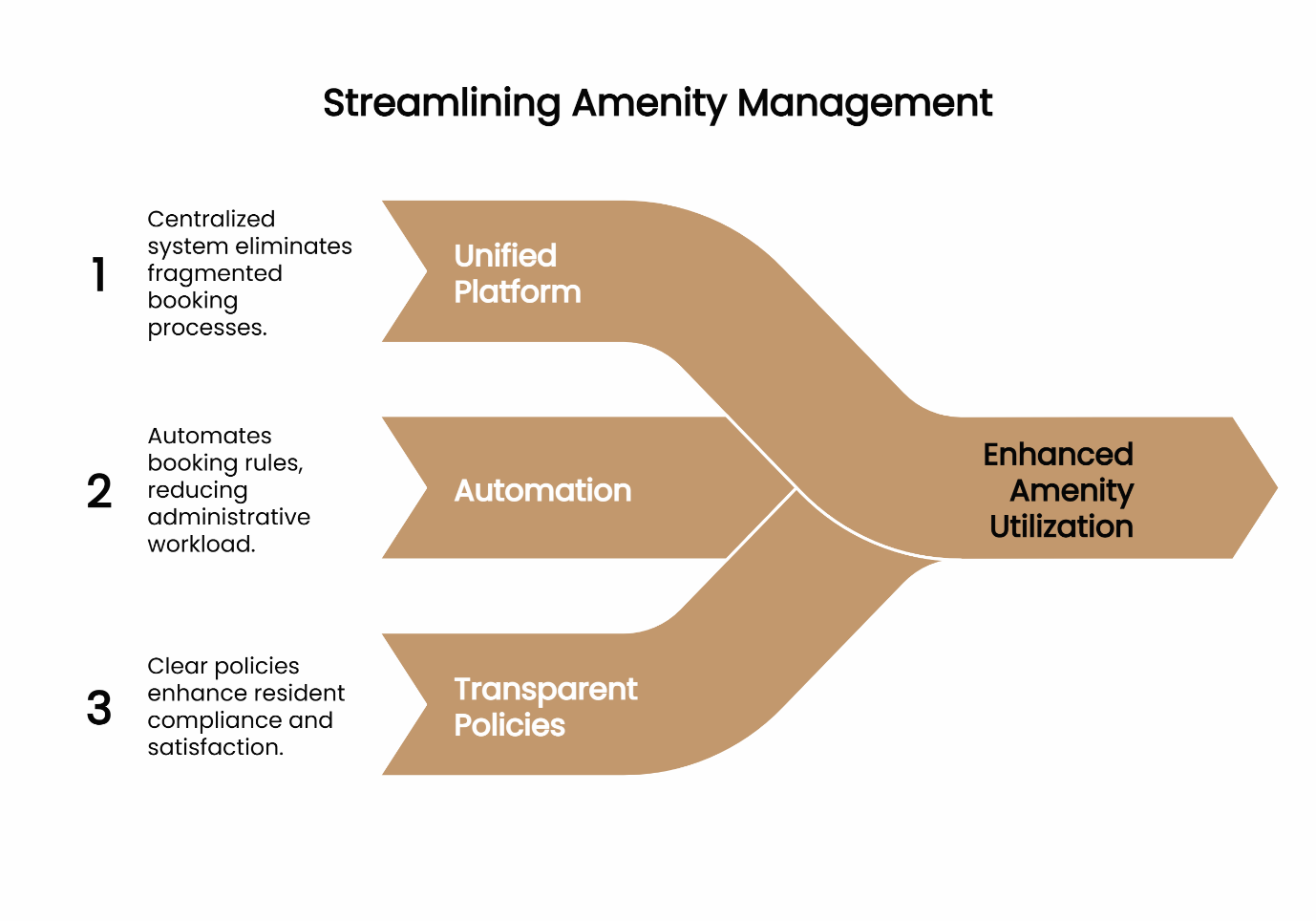
Property Management Software has component Amenity Management. In unified platforms such as ElevateOS, amenity management is not a sidecar—it’s a core operational engine. When bookings live across spreadsheets, emails, and point tools, teams juggle exceptions and miss opportunities. The NMHC CX Technology study observes that many operators manage 10–20 different solution providers to deliver the resident experience—a recipe for fragmented processes and duplicated effort. Consolidation reduces friction for staff and residents alike. (National Multifamily Housing Council)
Amenity Management enables NOI growth. Rules such as caps, buffers, and pricing windows convert demand into realized usage while minimizing idle time and conflicts. In practice, automation lifts throughput and reduces administrative labor by standardizing decisions at the platform level—especially when residents can self-serve inside a unified resident app.
Amenity Management maintains luxury experience standards. Research in hospitality consistently shows that transparent, fair policies improve customer perceptions and willingness to comply with rules—vital when enforcing access limits in premium communities. (eCommons, searchamelia.com)
Key Terminology (Beginner-Friendly)
- Eligibility: Who can book (e.g., unit type, account status).
- Booking Cap: Maximum bookings per unit or resident in a period (day/week/month).
- Buffer: Non-bookable time between reservations to clean, reset, or prevent overlap.
- Blackout Window: Period when booking is restricted (maintenance, private events).
- No-Show Policy: Rules and consequences for missed reservations (warnings, fees, temporary limits).
The 7-Step Amenity Automation Workflow
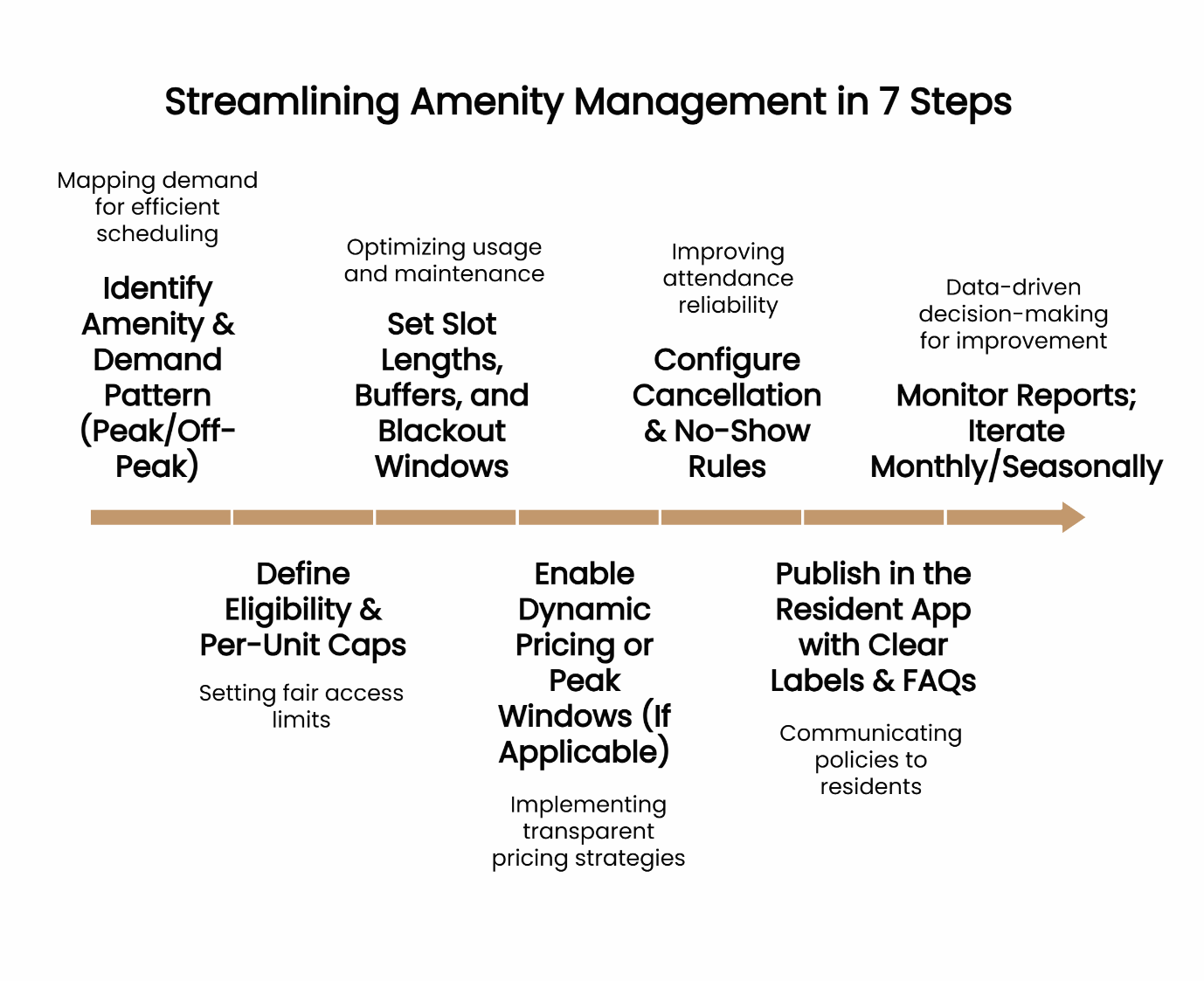
Configure your first amenity with these 7 steps; most teams can launch a live, automated flow in under a workday.
Step 1: Identify Amenity & Demand Pattern (Peak/Off-Peak)
Map real demand by day and hour. Select one amenity to pilot (e.g., Pool – Lap Lanes). Note peak windows to guide slot design and (if used) differential pricing.
Step 2: Define Eligibility & Per-Unit Caps
Set eligibility (active residents only; good standing). Apply per-unit daily/weekly caps to distribute access fairly—e.g., 1 booking/day and 3/week for lap lanes. Publish caps visibly in the resident app to set expectations.
Step 3: Set Slot Lengths, Buffers, and Blackout Windows
Choose slot duration to match real usage and cleaning needs. Example: 45-minute lane slots with a 10-minute buffer; schedule mid-day blackout for maintenance. Buffers protect turnover and reduce conflict at high utilization.
Step 4: Enable Dynamic Pricing or Peak Windows (If Applicable)
If your community uses amenity pricing, define peak windows (e.g., evenings/weekends) and modest price differentials. Hospitality research indicates acceptance rises when rules are transparent and framed as fair. Use clear labels and avoid surprises. (ResearchGate)
Step 5: Configure Cancellation & No-Show Rules
Require cancellations before a cutoff (e.g., 2 hours). Auto-release no-shows to a waitlist after a short grace period. Evidence from service scheduling shows that clear policies and enforcement improve attendance reliability, increasing realized usage. (ScienceDirect, SpringerLink)
Step 6: Publish in the Resident App with Clear Labels & FAQs
Use resident-facing names (“Lap Lane A”), display caps/buffers/penalties, and include a short FAQ. Promote via announcements and onboarding checklists inside the all in one resident app.
Step 7: Monitor Reports; Iterate Monthly/Seasonally
Track requests vs. fulfilled slots, no-show rates, and peak overflow. Analytics are the bridge from operations to reinvestment decisions; industry practice shows data-driven reporting improves capital and resource allocation decisions over time. (McKinsey & Company)
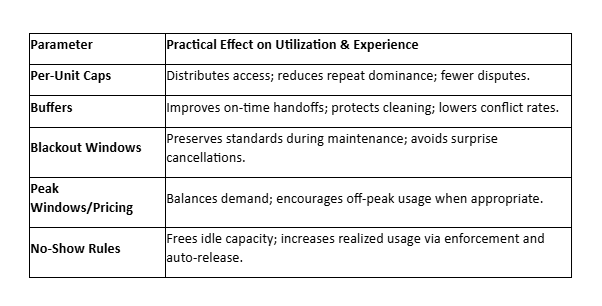
Parameter Effects Mini-Table
Rollout & Policy Template (Essentials)
- Eligibility: Active residents with accounts in good standing.
- Booking Limits: 1 reservation/day; 3/week; 14-day booking horizon.
- Cancellations: ≥2 hours before start.
- No-Show: Auto-release after 10 minutes; escalating penalties.
- Communication: Policy summary displayed on amenity detail page in the resident app; reminder notifications 24 hours and 1 hour prior.
Risks & Mitigations: Protecting the Luxury Experience
- Overbooking / Conflicts → Use buffers and per-unit daily caps; keep slot labels and transitions explicit.
- Perceived Unfairness → Publish policies in plain language; ensure audit logs and visible histories are accessible to staff for dispute resolution. Research shows transparency improves fairness perceptions. (eCommons)
- No-Shows Depressing Usage → Apply graduated penalties and auto-release waitlists; send reminders and confirm taps.
Technical Note (IT/Security): Use SSO for staff access, role-based permissions for policy edits, and reservation audit logs for compliance and dispute resolution.
Business Impact (Finance/Exec): Expect gains in three buckets—utilization lift, admin-hour reduction, and no-show reduction. Magnitude varies by amenity and season; the mechanism is predictable: governed rules reduce friction and convert demand into realized usage.
Day-to-Day Example (Ops): Lap pool lanes → 45-minute slots, 10-minute buffers, 1 booking/day cap. Waitlist auto-releases spots after 10 minutes if not checked in.
What If Peak-Season Demand Overwhelms Your Setup?
- Temporarily increase caps to spread access (e.g., add an extra weekly slot per unit for holiday weeks).
- Add or lengthen the buffer to keep handoffs clean during heavier traffic.
- Turn on auto-waitlist with 10-minute auto-release to keep slots from idling.
From Manual Headaches to a Reliable NOI Lever
Return to that Monday morning inbox. With automation in place, residents self-select fair, visible slots; buffers protect standards; no-shows release to grateful neighbors; staff time shifts from gatekeeping to hospitality. Utilization rises, conflicts fall, and the community looks and feels five-star.
According to the ElevateOS approach, amenity automation works when governance rules are clear, visible, and consistently enforced.
Ready to tie amenity usage to NOI at scale? In the Unified Living Ecosystem, amenity management and the resident app unify policy, booking, and experience into one flow—so every click reflects your standard.
Start Measuring the Upside Today
Calculate Your Potential Revenue. Use our quick estimator to model utilization lift, time saved, and realized usage by amenity type—then prioritize where to launch first.
Sources & Further Reading
- NMHC/RealFoundations, 2023 CX Technology Report (Highlights) — fragmentation across 10–20 providers and CX automation trends. (National Multifamily Housing Council)
- Cornell Center for Hospitality Research — fairness of reservation and pricing policies influences compliance and satisfaction. (eCommons, searchamelia.com)
- Scheduling research — clear no-show/cancellation policies improve attendance reliability and free capacity. (ScienceDirect, SpringerLink)
- Analytics for reinvestment — decision quality improves when usage data informs capital and operational allocation. (McKinsey & Company)
Resources
- Learn how resident apps integrate with PMS to boost efficiency
- See seven high-impact amenities that drive satisfaction
- Understand maintenance automation’s effect on service speed
- Track amenity success with the right metrics
Our Editorial Process
Our expert team uses AI tools to help organize and structure our initial drafts. Every piece is then extensively rewritten, fact-checked, and enriched with first-hand insights and experiences by expert humans on our Insights Team to ensure accuracy and clarity.
About the ElevateOS Insights Team
The ElevateOS Insights Team is our dedicated engine for synthesizing complex topics into clear, helpful guides. While our content is thoroughly reviewed for clarity and accuracy, it is for informational purposes and should not replace professional advice.
Structured Data Recommendation (for Dev/SEO): See Section 5.C (HowTo schema + entity disambiguation; add Hub Stable ID when available).