.avif)
📌 Key Takeaways
A branded resident app consolidates fragmented operations into one interface, reducing site-team workload while elevating the resident experience beyond what generic property management portals deliver.
- Eliminate System Toggle Tax: Consolidating packages, amenities, communications, and maintenance into one dashboard reduces duplicate inquiries and manual booking conflicts.
- Verify Integration Depth First: Property management platform connections range from basic ledger reading to full two-way work order writing—compatibility requires technical validation.
- Apply Fair Housing Through Objective Tiers: Service differentiation based on lease type or premium status is legally permissible when applied consistently, not discriminatorily.
- Model Revenue by Property Demographics: Ancillary income from housekeeping, fitness classes, and amenity bookings depends on resident demand and vendor availability in specific zip codes.
- Brand Loyalty Beats Generic Apps: White-label mobile apps carrying the building's identity drive adoption better than residents downloading third-party container apps.
Unified operations = retained residents and stabilized NOI.
Property managers evaluating resident experience technology will gain decision-ready criteria here, preparing them for the vendor evaluation checklist and implementation roadmap that follow.
It's 9:00 AM on a Monday. Packages are stacked in the lobby. The phone is ringing. A resident is asking whether the rooftop deck is available for dinner tonight. Your site team is toggling between inboxes, spreadsheets, and a portal that was built for accounting—not for living.
You invested millions into a Class A building. The amenities are there. The service promise is clear. But the digital layer holding it all together? Fragmented. Clunky. Off-brand.
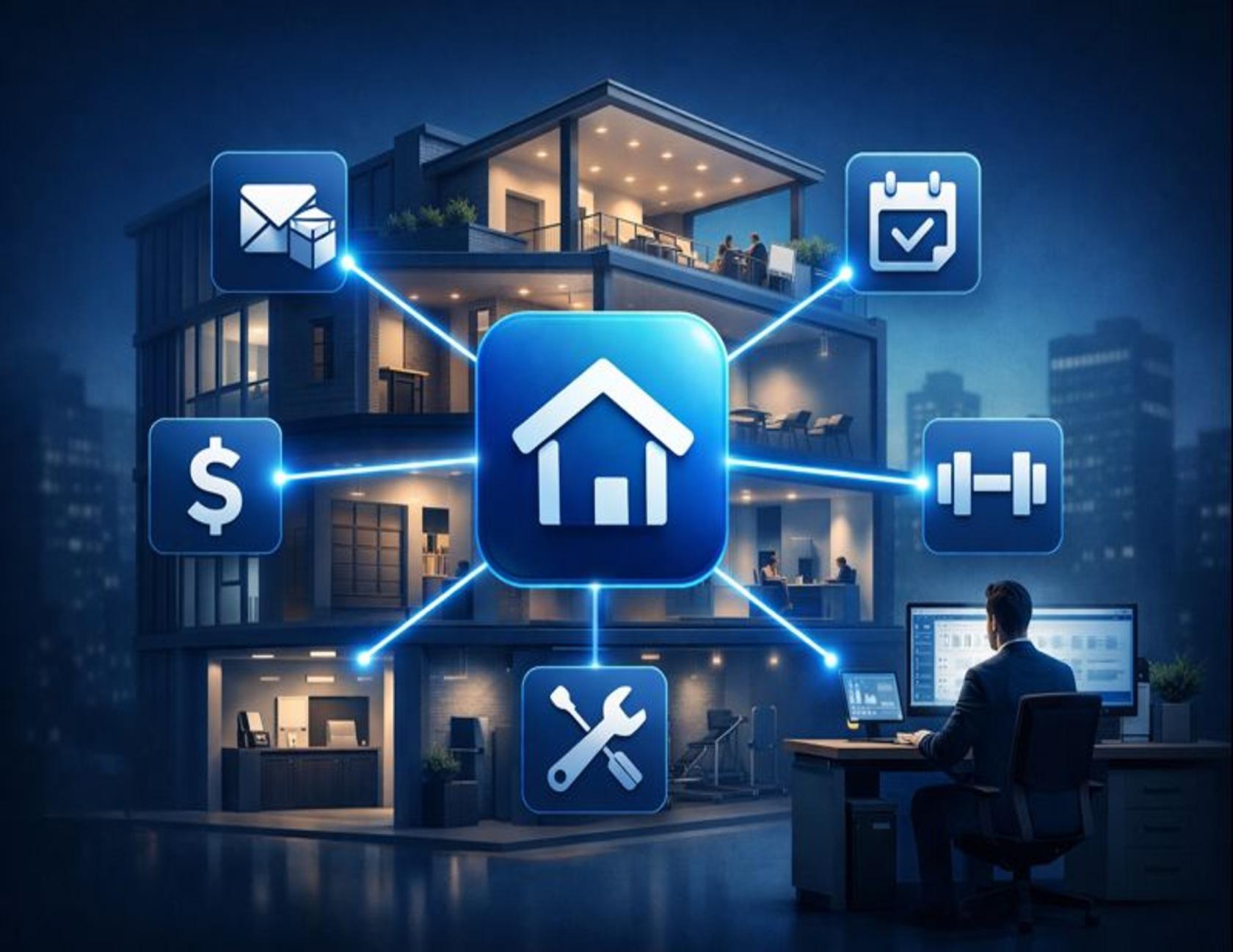
A branded resident app is a white-label mobile interface that consolidates resident tasks and building services—payments, requests, amenities, and communications—into a single, branded experience. It's the operating system for the resident's entire living experience. Unlike a standard Property Management System (PMS) portal built for transactions and accounting workflows, a branded app is designed around daily living and resident engagement.
This guide walks you through what a branded resident app actually is, why it matters for your Net Operating Income (NOI), and how to launch one without overwhelming your site team.
What is a Branded Resident App?
A branded resident app (sometimes called a custom community app or white-label building app) is a custom-branded mobile platform that unifies property operations and lifestyle services under your community's identity. It serves three audiences simultaneously:
For residents, it's the single place to pay rent, request maintenance, book amenities, join events, and access concierge-style services—all without toggling between logins or hunting for paper sign-up sheets.
For site teams, it's a consolidated operations hub that reduces the "system toggle tax." Instead of managing packages in one tool, amenities in a spreadsheet, and communications via email blasts, everything flows through one interface.
For owners and developers, it's a strategic lever. A branded app increases brand equity by keeping your management company's name front-and-center. It enables ancillary revenue streams—think housekeeping, fitness classes, or event space bookings—while reducing operational friction that drives up costs and churn.
The metaphor that resonates with most property leaders: it's the remote control for the resident's entire living experience. One button opens the app. From there, they can handle everything.
Explore ElevateOS's Branded Resident App and the broader Resident App category for context.
Resident Portal vs. Branded App: What Changes (and Why It Matters)
Most Property Management Systems include a resident portal. These portals work fine for rent collection and basic maintenance ticketing. But they weren't designed for experience. They were designed for accounting.
Here's what shifts when you move from a generic portal to a branded resident app:

The gap between these two columns is what we call the "paying rent versus living well" divide. A portal gets residents through the transaction. A branded app gets them engaged in the community.
As one Google reviewer put it: "The app is incredibly intuitive and puts everything I need right at my fingertips. Booking amenities like the gym or rooftop deck is a breeze—no more paper sign-ups or guessing availability."
Why This Shift Matters in Class A Communities
Class A communities are judged on consistency and convenience. When residents perceive the experience as disjointed—different logins for different needs, inconsistent communications, unclear amenity rules—the building starts to feel less premium regardless of finishes.
A branded app helps close that perception gap by making access feel seamless. It doesn't replace hospitality. It supports it by making hospitality easier to deliver at scale.
What a Branded Resident App Should Include in a Class A Community
Not all resident apps are created equal. For a Class A community, the app should feel less like a utility and more like a hospitality platform. Here's what that looks like in practice:
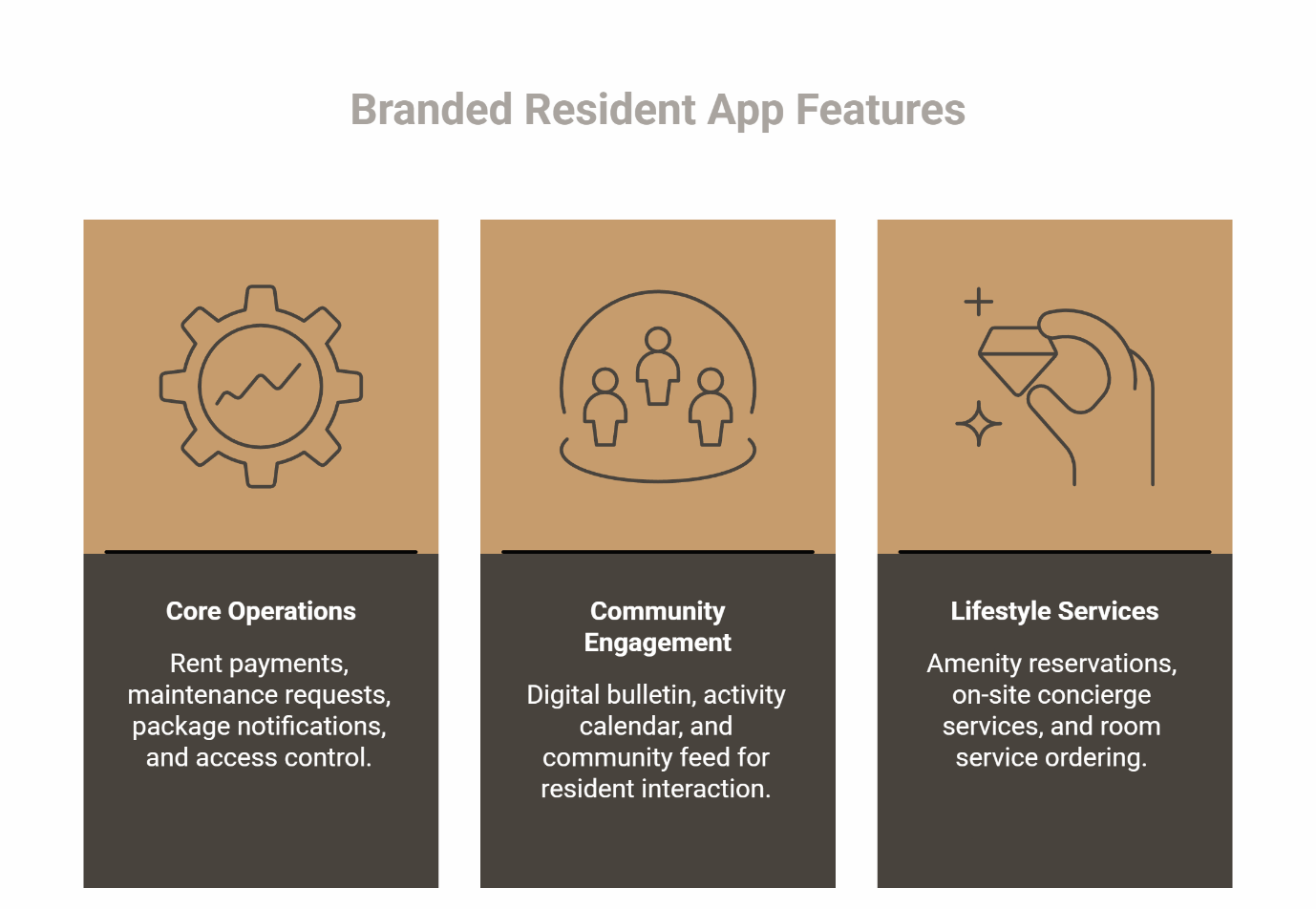
Core Operations
- Rent payments: One-click payment with receipt history
- Maintenance requests: Photo upload, real-time status updates, and staff assignment visibility
- Package notifications: Alerts when deliveries arrive, with digital logs
- Access control: Virtual keys, guest management, and elevator scheduling
Community Engagement
- Digital bulletin: Building-wide announcements and newsletters
- Activity calendar: Upcoming events with RSVP functionality
- Community feed: Neighbor-to-neighbor updates, recommendations, and interest groups
Lifestyle Services
- Amenity reservations: Real-time booking for the gym, pool, conference room, or rooftop deck
- On-site concierge services: Book housekeeping, massage therapy, personal trainers, or pet care
- Room service ordering: Order food delivery or schedule chef services (for applicable communities)
These capabilities align with common operating priorities: reduce confusion, reduce back-and-forth, and reduce the number of "where do I do that?" interactions. Which services are appropriate depends on the building's positioning, staffing model, and vendor partner ecosystem. The app enables access and orchestration; the building still needs a delivery model behind it.
Fair Housing & Equal Access
To align with Fair Housing principles, access to services, tools, and amenities must be administered without discrimination based on protected classes. When configuring your app, ensure that service tiers and amenity booking rules are applied consistently based on objective criteria (e.g., lease type or premium tiers) rather than subjective selection, reducing the risk of disparate impact claims.
Policies should be understandable and accessible. This ensures that service tiers, amenity rules, and communication channels do not inadvertently create a "two-tier" resident experience based on technical literacy or device preference.
This isn't just a compliance checkbox—it's foundational to building trust.
How Branded Apps Reduce Site-Level Chaos
Site teams are overworked. Turnover is high. Adding another tool to manage feels like the last thing anyone needs. But here's the counterintuitive reality: a unified app reduces workload by eliminating the "system toggle tax."
The System Toggle Tax
Without a branded app, a typical leasing agent or property manager juggles:
- A PMS portal for rent and leases
- A separate package management system
- A spreadsheet or paper calendar for amenity bookings
- Email and text threads for resident communications
- A third-party app for access control
- Manual coordination for lifestyle services
Each system requires a different login, a different workflow, and a different set of resident instructions. The result? Missed package notifications. Double-booked amenities. Residents calling the office because they can't figure out which app to use.
A branded app consolidates these workflows. The site team sees one dashboard. Residents see one app. The Monday morning package pile-up becomes a scan-and-notify process. The grill booking happens in real time, with no phone calls required.
Micro-Moment Examples
These are examples of how fragmentation shows up in everyday operations:
- A resident cannot reserve the grill because the portal is down, then calls the leasing office, then emails, then shows up in person—creating three separate touchpoints for one request.
- A package overflow situation triggers ad hoc texting and handwritten notes instead of a clear, centralized update stream.
A branded app doesn't eliminate operational challenges, but it creates a single "source of truth" for residents and staff.
What Residents Say
"We have been able to provide amenities to our residents that no other company could. Working with Elevate's team at the site level is always seamless." —Danny G (Google Reviews)
"Fantastic resident experience software provider! Their app offers a seamless and modern resident service, making bored property processes easy and fun for both residents and property owners." —Vadik G (Google Reviews)
How a Branded App Supports NOI Without Turning This Into an ROI Pitch
Let's be direct: a branded app isn't magic. It won't print money. But it does create the conditions for stronger financial performance across three levers.
Retention
Residents renew when the experience feels effortless. A branded app signals modernity and care. It reduces friction at every touchpoint. Over time, these small wins compound into higher renewal rates.
Retention matters because turnover costs—marketing spend, vacancy loss, unit prep—erode NOI faster than almost anything else. Actual outcomes depend on building strategy, service quality, resident demand, and market conditions. The app is an enabler, not the sole driver.
Operational Efficiency
Unified systems mean less time hunting for information and fewer errors from manual data entry. Site teams spend less time answering "Where's my package?" calls and more time building relationships.
When staff spend less time chasing information and more time executing, service levels stabilize. In practical terms, consolidation reduces duplicate inquiries, manual booking conflicts, and missed communications caused by scattered channels. This isn't about replacing people with technology. It's about giving people an operating system that reduces rework.
Efficiency doesn't just save labor costs; it improves service quality, which loops back to retention.
Ancillary Revenue Enablement
A branded app makes it easy to offer revenue-generating services—housekeeping, fitness classes, event space bookings—without creating operational chaos. Residents can discover, book, and pay for these services in seconds. The app creates a concentrated engagement ecosystem, where monetizable services generally contribute to per-unit revenue while enhancing the living experience.
The app supports the mechanics of that ecosystem by centralizing discovery, scheduling, and communication. This isn't about squeezing residents for fees. It's about offering premium, optional services that residents genuinely want and are willing to pay for. The app is the enabler.
Ancillary revenue strategies depend on resident demand, vendor availability, and operational capacity. Projected revenue uplift should be modeled based on specific property demographics, as outcomes are contextual.
Implementation Roadmap: A Practical Launch Plan
Launching a branded app doesn't require a six-month project or a specialized IT team. Here's a practical, phased approach that works for small site teams:
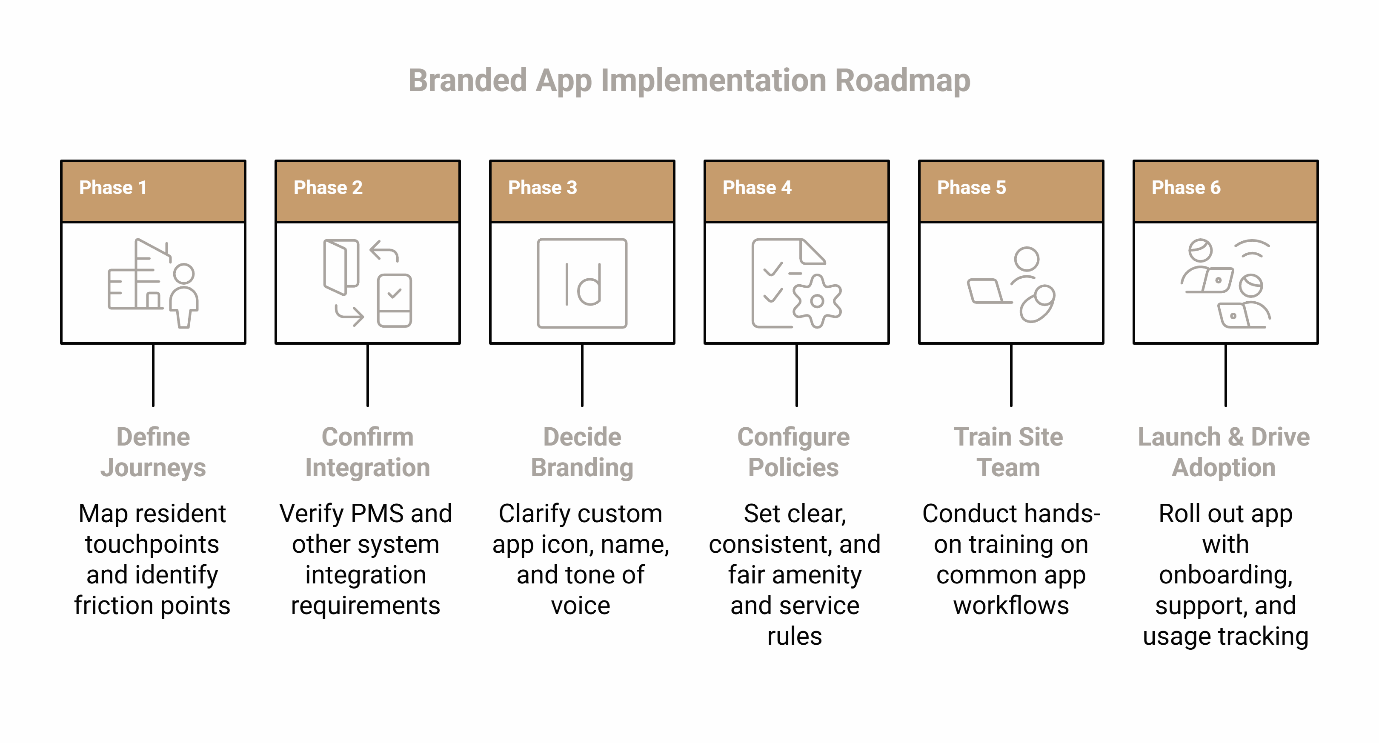
Phase 1: Define the Resident Journeys to Unify
Start by mapping the touchpoints residents currently navigate:
- How do they pay rent today?
- How do they submit maintenance requests?
- How do they know when a package arrives?
- How do they book amenities or sign up for events?
Identify the gaps and redundancies. Focus on the most common touchpoints that create friction: packages and building updates, maintenance requests and status, amenity reservations and policies, community communications and event visibility. This becomes your "unification scope." Avoid expanding scope until these journeys are clean and consistent.
Phase 2: Confirm PMS and Integration Requirements
Your branded app needs to talk to your existing Property Management System (PMS). Integration depth varies significantly. While many apps offer data synchronization with major property management platforms, functionalities range from basic ledger reading to full two-way writing of work orders and payments.
"Integration" may refer to single sign-on or authentication alignment, data sync for resident status, payment processing links, or work order routing. Integration availability varies by vendor and by the PMS environment. Verification should be part of vendor evaluation rather than an assumption.
If integration isn't seamless, your site team will end up managing duplicate workflows—exactly what you're trying to avoid. If broader operational tooling is relevant, ensure the app acts as a seamless overlay to your existing stack rather than a siloed tool.
Phase 3: Decide Branding Requirements
This is where "white-label" becomes real. At minimum, clarify:
- A custom app icon and name
- Branded color scheme
- Tone of voice for in-app messaging
Branding is more than a logo. The goal: residents should feel like they're using your building's app, not a generic third-party tool. For the ecosystem worldview, the goal is "invisible but powerful": residents should not need training to complete routine tasks.
Phase 4: Configure Policies Fairly
Set clear, consistent rules for amenity bookings, service access, and communications. Ensure equal access across all residents. Document these policies within the app so residents can self-serve answers to common questions like "How far in advance can I book the conference room?"
Policies should be understandable and accessible. Refer to the Fair Housing protocols established earlier to ensure amenity windows and service tiers do not create liability.
Phase 5: Train the Site Team
Make it easy. Avoid complexity. Walk the team through the most common workflows:
- How to mark a package as received
- How to assign a maintenance request
- How to approve an amenity reservation
- Posting an update to the feed/bulletin
- Responding to common resident questions ("Where do I…?")
Schedule short, hands-on training sessions. Don't overwhelm them with every feature on day one. Keep the training checklist short. High complexity discourages adoption.
Phase 6: Launch and Drive Adoption
Roll out the app with clear onboarding:
- Push notifications announcing the launch
- Step-by-step setup guides (ideally with screenshots)
- A short "top 3 things to do in the app" message
- Office hours where residents can get help in person
- Clear escalation paths (what happens if something goes wrong)
Adoption takes time. Plan for a 60-90 day ramp-up period. Track usage metrics and adjust messaging as needed. Residents adopt what is clearly useful.
For amenity workflows specifically, consider pairing rollout with an Amenity Management operating refresh, or a standalone tool such as Amenity Management Software when appropriate.
Vendor Evaluation Checklist
Not all branded resident apps are built the same. When evaluating vendors, use this checklist to guide your decision:
Integration & Compatibility
- [ ] Does the app integrate with your existing PMS?
- [ ] Can it connect to your package management system, access control, and smart home devices?
- [ ] Is the integration real-time, or will data sync with delays?
- [ ] What level of integration is supported—basic ledger reading or full two-way work order and payment writing?
Ease of Use for Site Staff
- [ ] Is the management dashboard intuitive?
- [ ] Can staff complete common tasks (like marking packages or assigning requests) in under 30 seconds?
- [ ] Does the vendor provide training and ongoing support?
White-Label Customization
- [ ] Can you fully brand the app with your community's name, logo, and colors?
- [ ] Does the app allow custom messaging and notifications in your brand voice?
Service Layer Capability
- [ ] Does the app support lifestyle services (housekeeping, fitness, concierge) or is it just operations?
- [ ] Can you monetize amenities and services through the app?
- [ ] Is there a marketplace for residents to discover and book services?
Support & Partnership
- [ ] Does the vendor offer on-site onboarding and resident adoption support?
- [ ] What's the typical response time for technical issues?
- [ ] Will they help you configure policies and workflows, or is it self-service only?
This checklist ensures you're not just buying software—you're partnering with a team that understands multifamily property management. If more background is useful, review About Us or use Contact to ask specific implementation questions.
FAQ
Does it integrate with my PMS?
Integration depth varies significantly. While many apps offer data synchronization with major property management platforms, functionalities range from basic ledger reading to full two-way writing of work orders and payments. Integration can mean anything from single sign-on to data synchronization to workflow routing.
The safest approach is to define the required workflows (payments, resident status, work orders, communications) and validate each one in vendor conversations before selecting a solution. Verify compatibility with your specific PMS version during the vendor evaluation process.
How does it actually make money?
A branded app is best understood as an enablement layer, not a revenue promise. It enables ancillary revenue through optional services like housekeeping, fitness classes, amenity bookings, and event space bookings. Residents pay for these services directly through the app.
The app also supports NOI-related levers through reduced friction that supports retention, improved operational efficiency through consolidation, and enablement of optional services and amenity programming. Actual outcomes depend on building strategy, service quality, resident demand, and execution.
How long does it take to launch?
A typical launch takes 30-90 days, depending on the complexity of your PMS integration and the number of features you're activating. A practical way to think about timeline is by phases: initial scope definition, configuration and branding, integration validation, staff training, and resident rollout and onboarding. Phased rollouts—starting with core operations, then adding lifestyle services—can shorten the initial timeline. A vendor should be able to outline these phases and the responsibilities on both sides.
What about fair housing compliance?
All features, services, and communications in the app must be administered without discrimination based on protected classes. This is a legal requirement under fair housing laws. When configuring policies, ensure that service tiers are applied consistently based on objective criteria rather than subjective selection. Policies and communications should be designed to avoid creating unequal access based on factors unrelated to lease terms or property tier.
Can residents still call the office if they don't want to use the app?
Yes. A branded app is an additional channel, not a replacement. Residents should always have the option to call, email, or visit the office. The app simply makes self-service faster and easier for those who prefer it.
Next Step
A branded resident app isn't a luxury—it's infrastructure. It unifies operations, elevates the resident experience, and creates the conditions for stronger financial performance.
If you're ready to explore what a branded app could look like for your community, schedule a demo with ElevateOS. See how a white-label app integrates with your existing systems, consolidates site-level chaos, and creates a concentrated engagement ecosystem for your residents.
Not ready to schedule? Subscribe to our newsletter for practical insights on amenity management, resident engagement, and modern property operations through the ElevateOS Blog.
Resources
For foundational guidance on fair housing and equal access:
- HUD – Fair Housing and Equal Opportunity
- National Multifamily Housing Council (NMHC)
- National Apartment Association (NAA)
- ElevateOS on LinkedIn
Disclaimer: This article is for informational purposes only and does not constitute professional advice. Please consult with qualified professionals for decisions specific to your property.
Our Editorial Process
Our expert team uses AI tools to help organize and structure our initial drafts. Every piece is then extensively rewritten, fact-checked, and enriched with first-hand insights and experiences by expert humans on our Insights Team to ensure accuracy and clarity.
About the ElevateOS Insights Team
The ElevateOS Insights Team is our dedicated engine for synthesizing complex topics into clear, helpful guides. While our content is thoroughly reviewed for clarity and accuracy, it is for informational purposes and should not replace professional advice.