.avif)
📌 Key Takeaways
Fragmented property management tools create service gaps that erode the premium experience Class A communities promise.
- Operational Fragmentation Costs More Than Time: Coordination gaps between disconnected systems cause double-bookings, aging maintenance tickets, and inconsistent response times that undermine asset value and resident satisfaction.
- The Command Center Model Unifies Under One Login: Centralizing communications, work orders, amenities, packages, and concierge services into a single workspace with shared SLAs eliminates tool-switching and creates portfolio-level service predictability.
- Phased Implementation Delivers Quick Wins: A 30-60-90 day rollout—starting with operational audits, progressing to system integration, and ending with SLA governance—enables small teams to transition without disrupting daily operations.
- Service Booking Patterns Signal Retention Risk: Residents who regularly book concierge services demonstrate deeper community engagement and correlate with stronger renewal rates, creating a forward-looking metric for retention strategy.
- Integration Security Builds Operational Trust: Write-back controls and three-checkpoint validation (authentication, data direction, error logging) allow Command Centers to read PMS data without contaminating source records, addressing the primary barrier to centralization.
Centralized operations transform reactive firefighting into proactive management while strengthening the hospitality-grade service consistency that protects premium positioning.
Property management teams overseeing Class A multifamily communities will find actionable implementation strategies here, preparing them for the detailed operational framework that follows.
Secure portfolio-level predictability through unified resident operations.
Picture the operational reality of a premium Class A community: Your property management team coordinates maintenance requests, amenity reservations, package deliveries, concierge bookings, and resident communications—all while preserving the hospitality-grade service experience your brand promises. When these workflows operate through disconnected systems, coordination gaps emerge. Response times vary. Service consistency wavers. The premium positioning your asset commands becomes harder to defend.
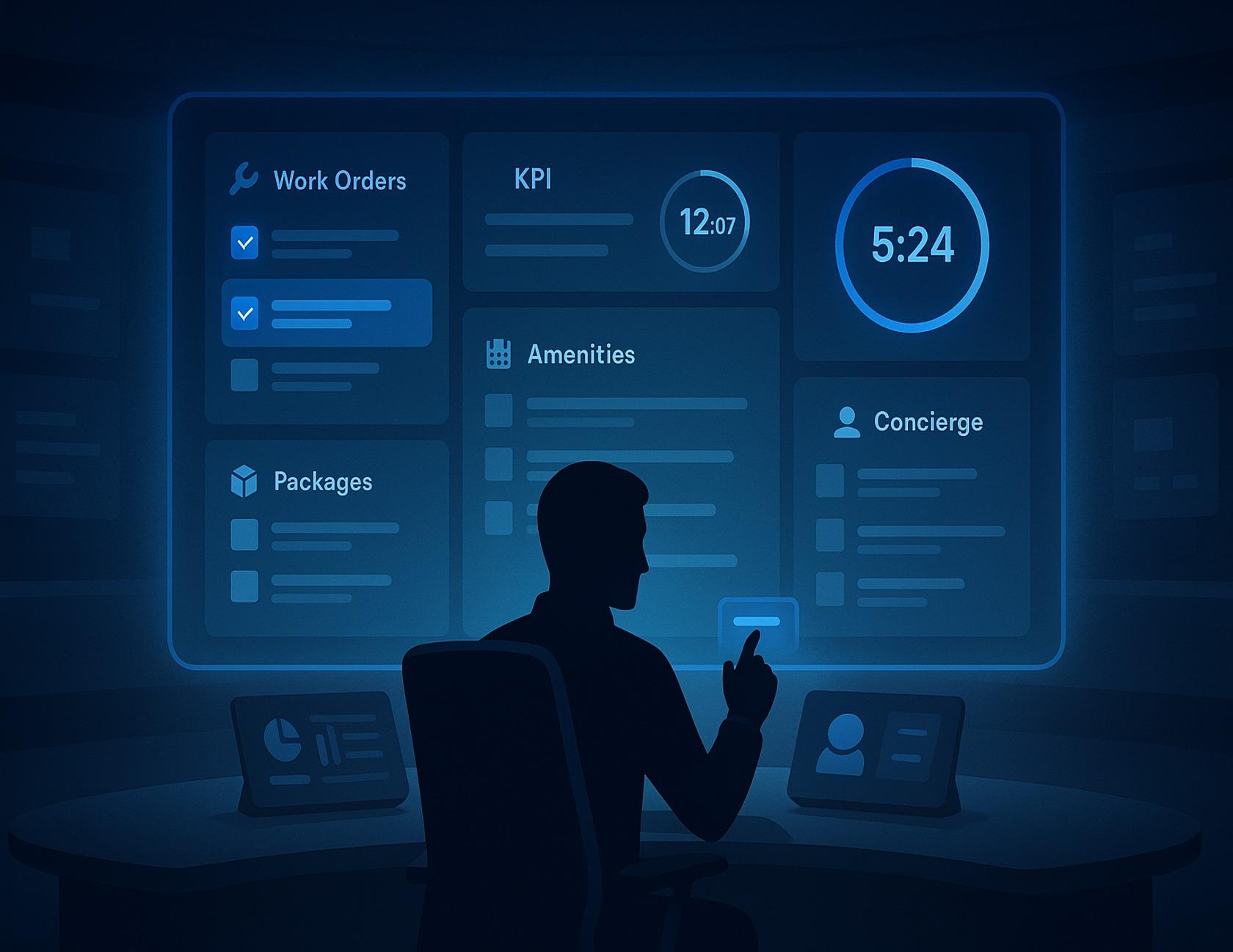
The Command Center approach offers a fundamentally different operational model. Instead of managing multiple platforms, property management teams can centralize resident communications, work orders, amenity bookings, access control, packages, and concierge services into one unified workspace. This consolidation creates portfolio-level service predictability: one comprehensive view that enables proactive coordination and consistent response across every resident touchpoint.
This article demonstrates how to transition from fragmented tools to centralized operational control using a practical 30-60-90 day implementation framework designed for Class A communities.
What a Command Center Secures
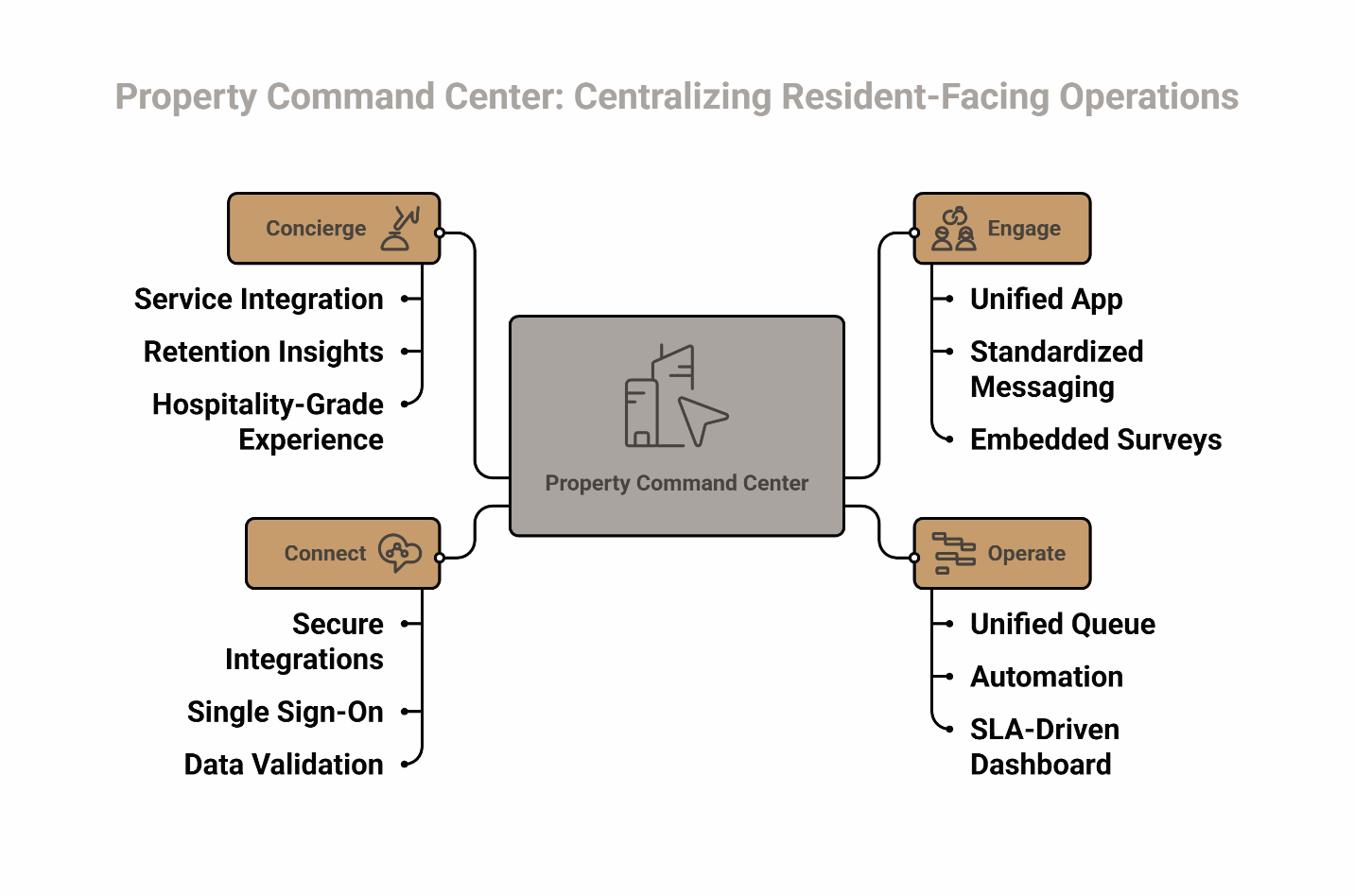
A property Command Center is a unified operational workspace that consolidates all resident-facing operations—communications, work orders, amenity reservations, package management, and service bookings—under shared service level agreements (SLAs) with single sign-on access. Instead of maintaining separate logins and manually reconciling data across platforms, your team works from one dashboard that reveals property operational health in real time.
The immediate value can be measurable. Industry research from organizations like the National Multifamily Housing Council consistently shows that communities using integrated platforms report improvements in operational efficiency and resident satisfaction. When everything flows through one system, coordination gaps disappear. Double-entry vanishes. Service consistency strengthens across the portfolio.
Here's where to start: Run a 30-minute operational audit. Count every platform your team uses for resident operations. Then identify which notifications you're receiving through multiple channels. This exercise reveals the extent of fragmentation and becomes your baseline for measuring operational improvement.
Next, begin consolidating those notification channels. Establish SLA tiers in your workspace: safety issues (immediate response), urgent requests (4-hour window), and standard items (24-hour turnaround). These visual indicators help your team prioritize without constant manual triage.
Pillar 1 — Engage: Centralize Communication & Resident Signals
The first pillar addresses a critical operational challenge: resident communications scattered across email, text messages, phone calls, and multiple apps create service gaps where important updates slip through.
A centralized engagement layer combines announcements, surveys, event RSVPs, and community feeds into one resident-facing channel through a white-label resident app. Your property management team posts once, and residents receive updates through their branded community platform. In many Class A communities, residents encounter multiple separate apps for basic building interactions—sometimes as many as seven or more depending on property configuration. This consolidation can dramatically reduce app fatigue while deepening engagement insight for your team.
The practical application starts with template packs. Create standardized sequences for move-in communications, maintenance outage notices, and event coordination. These templates ensure hospitality-grade consistency while saving operational time. When a new resident moves in, they automatically receive a welcome series that introduces community features, explains how to submit requests, and highlights upcoming events.
One property manager who implemented this approach captured the transformation: "We use it at every property... residents love it... Five stars all the way!" The key was eliminating app fatigue by consolidating every resident interaction into one branded platform rather than forcing multiple app downloads for different functions.
Surveys become more actionable when they're embedded in the same platform residents use daily. Instead of sending separate survey links via email that get ignored, you can prompt feedback at natural touchpoints—after a maintenance visit closes or following an amenity reservation. Research on experience-led platforms shows that integrated communication and feedback systems consistently deliver stronger service quality and satisfaction in managed communities.
The benefit pairing is direct: centralized communication through a white-label app delivers both operational efficiency (one posting channel) and strategic insight (engagement analytics your PMS doesn't capture).
Pillar 2 — Operate: One Queue for Work Orders, Packages & Amenities
The second pillar tackles the operational complexity that emerges when managing requests, packages, and amenities across disconnected systems.
When work orders live in one system, amenity bookings in a spreadsheet, and package notifications in a separate tool, coordination gaps are inevitable. Double-booked spaces occur. Maintenance tickets age without visibility. Package backlogs grow until residents escalate.
A unified operations queue fundamentally changes this pattern. Every request type—whether it's a maintenance issue, a party room reservation, or a package arrival notification—appears in one dashboard with clear status indicators and SLA timers. Your team sees everything in priority order without switching contexts, which directly improves first-response time and service consistency.
The immediate operational step is establishing a strict "no spreadsheet" policy for amenity management. Package management tools should feed directly into your operations dashboard, and maintenance requests should trigger workflows automatically rather than requiring manual tracking.
Amenity auto-approvals become possible when rules are built into the system. If the yoga studio is available and the resident has no outstanding violations, the system approves the booking instantly. It flags exceptions—like residents attempting to book the same space twice in one week—for manual review. This automation streamlines most resident interactions while maintaining appropriate oversight for brand protection.
Your package queue should surface arrivals chronologically with resident notification status clearly visible. When a resident receives an instant notification about their delivery, front desk volume drops measurably—a small operational change that creates significant efficiency gains.
The benefit pairing: unified operations queues deliver faster service recovery (nothing ages silently) and staff efficiency (one workspace replaces multiple tool logins).
Pillar 3 — Connect: Integrations, SSO & Data Boundaries
The third pillar addresses a concern that often stops centralization efforts before they start: the trust implications of system integration.
You don't need to replace your property management system (PMS) to implement a Command Center approach. The key is establishing secure integrations with clear data boundaries. Single sign-on (SSO) reduces credential risk—your team authenticates once and gains access to connected systems without managing multiple passwords. Drawing from NIST principles for structured system management and incident handling, central platforms should expose clear integration boundaries and logging rather than unmanaged connections. This architectural approach positions security as the foundation of service predictability.
The critical concept is write-back controls. Your Command Center can read data from your PMS—unit numbers, lease dates, resident contact information—without contaminating your PMS records. When configured properly, updates flow one direction for most data types, preventing the accidental overwrites that create trust concerns about integration.
Before going live with any integration, run this three-checkpoint validation:
First, verify authentication works correctly. Can team members log in using their existing credentials? Do permissions map appropriately to their roles?
Second, confirm data direction. Which system is the source of truth for each data type? Where do updates get written? Document these flows explicitly to prevent confusion later.
Third, test error logging. When something fails—and eventually something will—does your team receive clear notification? Can they quickly identify whether the issue is in the Command Center, the PMS, or the connection between them?
The integrations available extend beyond your PMS. Access control systems, package lockers, smart thermostats, and other IoT devices can feed status updates directly into your operations dashboard. This connectivity eliminates the manual work of checking multiple systems throughout the day.
The benefit pairing: secure integration architecture delivers operational trust (clear data boundaries) and team efficiency (one authentication, multiple systems).
Pillar 4 — Concierge: Services as an Operating Lever
The fourth pillar transforms how Class A communities deliver premium experiences while maintaining operational control.
Traditional concierge services often operate outside property management workflows, creating coordination challenges. A resident books housekeeping through a third-party app, expects service that doesn't arrive because the booking failed to sync, and your team spends time on service recovery for the miscommunication.
When curated services—hotel-style concierge offerings including housekeeping, pet care, wellness appointments, and personal training—live within your Command Center, they become part of your operational flow with professional event planning teams coordinating execution. Residents book through their community app, your operations dashboard shows upcoming service appointments, and your team can proactively address conflicts or special requests. All services are available to all residents, with access managed fairly according to community policy.
The practical path is piloting one high-demand service category rather than launching everything simultaneously. Pet care typically generates immediate interest in Class A communities. Start there. Track booking volume, resident satisfaction scores, and operational friction points. Use this pilot data to refine your approach before expanding to additional service categories.
Service bookings correlate with stronger resident retention patterns. When someone regularly books housekeeping or personal training, they're demonstrating deeper engagement with the community. While correlation doesn't prove causation—residents who are already satisfied may be more likely to use amenities—this pattern appears consistently across implementations. Tracking these bookings in your dashboard as a retention proxy provides a forward-looking metric that may help predict renewal likelihood and inform retention strategies.
The benefit pairing: integrated concierge services deliver hospitality-grade resident experience (consistent booking, predictable service) and retention insight (booking patterns correlate with renewal probability).
Your 30-60-90 Centralization Plan
Moving to a Command Center approach doesn't require dramatic system replacement. The key is phased implementation with clear decision points.
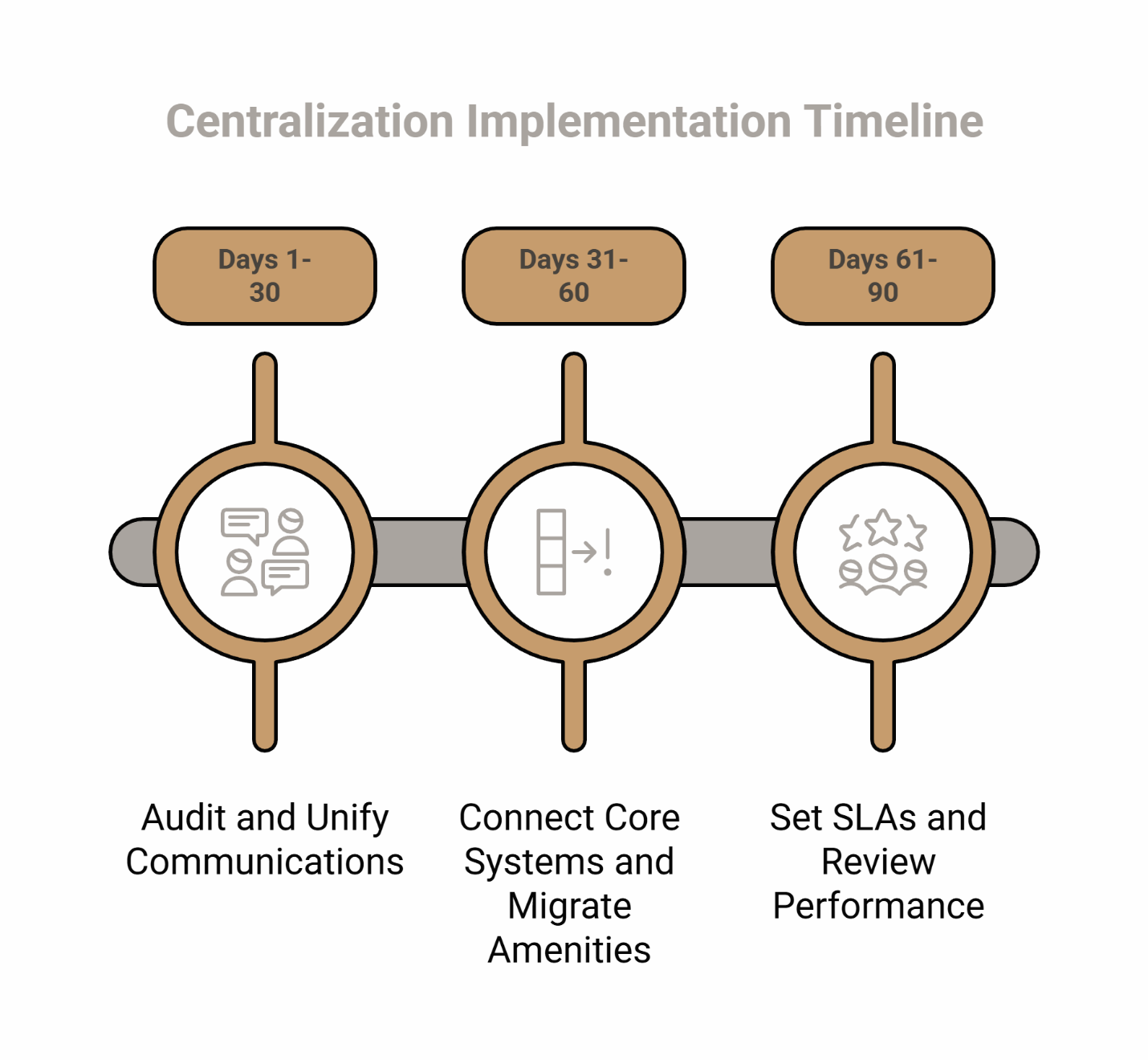
Days 1-30: Audit and Unify Communications
Start by inventorying every tool your team uses for resident operations. Create a simple spreadsheet listing each system, its primary function, how many team members access it, and approximate monthly cost. This inventory becomes your centralization roadmap.
Name a Command Center owner—someone responsible for coordinating the transition and serving as the go-to person when questions arise. This role doesn't require technical expertise, but it does require organizational authority to make decisions and resolve conflicts.
Begin unifying communications immediately. Even before full technical integration, you can establish one channel as your primary resident communication hub. Redirect announcements, event notices, and community updates to flow through this single point. Train your team to check one inbox first rather than monitoring multiple channels throughout the day.
Days 31-60: Connect Core Systems and Migrate Amenities
Month two focuses on technical integration and workflow migration. Connect your SSO system to enable single authentication across platforms. Integrate your PMS using the three-checkpoint validation process described earlier. Proper SSO implementation can significantly reduce help desk tickets related to access issues while strengthening operational trust.
Migrate amenity booking away from spreadsheets or disconnected tools. Configure booking rules, approval workflows, and conflict prevention logic. Test thoroughly with your team before opening to residents. The amenity management capabilities should include automated approvals for standard requests while flagging exceptions for manual review.
Standardize your maintenance ticket types and workflows. Create clear categories, set default SLA targets for each type, and configure automatic escalation when thresholds are breached. This standardization enables meaningful performance tracking in month three.
Days 61-90: Set SLAs and Review Performance
The final month establishes the operational discipline that makes centralization sustainable. Define specific SLA thresholds for each request type. Safety issues might require immediate team notification and 15-minute acknowledgment. Urgent requests could have a 4-hour response window. Standard maintenance might allow 24 hours for initial response.
Implement weekly variance reporting. Every Tuesday morning, review which requests missed their SLA targets the previous week. Look for patterns. If package notifications consistently arrive late on Mondays, you've identified a workflow bottleneck requiring attention. If amenity conflicts spike on Friday afternoons, you might need to adjust auto-approval rules for weekend bookings.
At day 90, make your portfolio decision. Has centralization reduced operational friction? Are SLA adherence rates improving? Does your team spend less time coordinating and more time on resident relationships? Use these metrics to decide whether to expand the approach to additional communities or refine the pilot further.
Communities that have implemented systematic centralization approaches with ElevateOS have reported measurable improvements in specific implementations. Examples from successful deployments include point solution reductions of up to 75%, net operating income increases of approximately $23 per unit monthly, and resident retention improvements of around 10 percentage points. Even a 2-3 percentage point improvement in renewal rates can materially impact turnover costs and portfolio valuation. However, these outcomes represent best-case scenarios from selected client implementations and will vary significantly based on property type, market conditions, existing operational baseline, implementation approach, and local economic factors. Individual results depend heavily on current technology stack, staff adoption, resident demographics, and competitive market dynamics.
Metrics That Matter in Your Command Center
The right dashboard metrics transform centralization from a technology project into an asset value initiative.
SLA adherence rates show whether your team is meeting commitments consistently. Track this by request type—safety, urgent, standard—to identify where performance gaps exist. Following established service-level frameworks, communities should monitor response time, availability, and quality measures as foundational discipline. A community maintaining 95% SLA adherence for standard requests but only 70% for urgent items has a clear priority for process improvement.
First-response time measures how quickly residents receive acknowledgment, even when resolution takes longer. Speed of initial response correlates strongly with overall satisfaction, independent of resolution time. Residents who know their request was received and assigned feel heard even while waiting for completion—a key element of hospitality-grade service delivery.
Ticket aging reveals requests that stalled in your workflow. Any maintenance ticket open longer than seven days should trigger investigation. Is there a parts delay? Did the technician need information from the resident that never arrived? Aging reports surface these stuck items before they become resident complaints or service recovery situations.
Amenity utilization rates indicate whether residents are taking advantage of community features. Low utilization might signal awareness problems—residents don't know the amenity exists. It might indicate friction in the booking process. Or it might reveal that the amenity itself doesn't match resident needs. Each scenario requires different interventions, but you can't act without visibility.
Service booking trends may work as indicators for retention patterns. Communities with higher per-resident booking rates for concierge services often observe stronger lease renewals in some implementations. When residents integrate these conveniences into their routines, they may be less likely to move. Track monthly booking volume alongside lease renewal rates to explore whether this correlation holds in your specific portfolio and market context.
Add these metric tiles to your daily operations review. Examine them in brief team stand-ups rather than waiting for monthly reports. This regular cadence helps teams spot emerging issues while they're still manageable and supports proactive service recovery.
See Your Command Center in Action
The shift from fragmented tools to centralized operations isn't just about technology—it's about securing consistent, hospitality-grade service delivery that protects property valuation and strengthens portfolio performance.
When you consolidate communications, standardize workflows, establish clear SLAs, and integrate supporting services into one operational workspace, operational complexity transforms into predictable capability. Your team moves from reactive coordination to proactive management. Residents experience faster responses, fewer service gaps, and smoother interactions at every touchpoint—the consistent premium experience your Class A positioning demands.
The 30-60-90 roadmap outlined above provides a practical path forward, whether you're managing a single community or coordinating across a portfolio. Start with the day-one audit. Unify communications in month one. Connect core systems in month two. Establish operational discipline in month three. Each phase builds on the previous one while delivering immediate operational value.
ElevateOS has implemented this Command Center approach across more than 450 client communities throughout the United States, with these communities reporting improved operational outcomes alongside stronger resident satisfaction in their specific implementations. The Command Center model works because it addresses the root cause of operational complexity: fragmentation. When everything flows through one system, with one login, under shared SLAs, the daily experience of property management can fundamentally improve while service consistency strengthens.
Talk to our team about designing a unified resident service fabric for your Class A portfolio and discover how centralized operations can elevate property management across your communities.
Frequently Asked Questions
What's the difference between a "Command Center" and a traditional management portal?
Traditional management portals typically focus on one aspect of operations—usually maintenance or communications. A Command Center unifies multiple operational domains (communications, work orders, amenities, packages, services) in a single workspace with coordinated workflows and shared SLA tracking. The difference is comprehensiveness and integration depth, which directly impacts service consistency across resident touchpoints.
Do I need to replace my PMS to centralize operations?
No. A properly architected Command Center integrates with your existing PMS rather than replacing it. Your PMS remains the source of truth for lease data, payments, and core accounting functions. The Command Center becomes your operational hub for resident-facing interactions while reading necessary data from your PMS through secure integrations with clear data boundaries.
How fast can a small team pilot a Command Center approach?
The 30-60-90 framework outlined above is designed specifically for small teams. The first 30 days require minimal technical work—primarily auditing current tools and establishing communication protocols. Month two involves integration work that may require vendor support. By day 90, even a team of two or three people can be operating fully from a centralized workspace with measurably improved service consistency.
Which KPIs prove that centralization is working?
Focus on three primary indicators: SLA adherence rates (are requests being handled within target timeframes?), first-response time (how quickly do residents receive acknowledgment?), and ticket aging (how many requests are stalled in your workflow?). Secondary metrics include amenity utilization rates and service booking volume as potential retention indicators that may tie to asset value depending on your market context.
How do amenities and services fit into the Command Center?
Amenities and services become operational inputs like maintenance requests or package notifications. When residents book the party room or schedule housekeeping, those reservations appear in your operations dashboard with appropriate status indicators. This visibility prevents conflicts, enables proactive communication about upcoming activities, and helps your team coordinate access and preparation efficiently. All services and amenities are available to all residents, with access managed equitably according to community policy.
Disclaimer: This article is for informational purposes only and does not constitute legal, financial, or operational advice. Every community is different; property owners and management teams should consult their own legal, financial, and technology advisors before making decisions about software, staffing, or resident policies. All services mentioned are available to all residents with equitable access managed according to community policy and fair housing requirements.
Our Editorial Process
Content from the ElevateOS Insights Team is developed using a combination of internal expertise, customer feedback, and reputable third-party research. Articles are reviewed for clarity and accuracy at the time of publication, but technology, regulations, and market conditions change quickly. Where data or sources are cited, readers should verify whether more recent information is available.
About the ElevateOS Insights Team — Our team turns complex topics in multifamily operations, resident experience, and proptech into clear, practical guides. While every piece is carefully reviewed, our content is intended to support—not replace—the judgment of experienced property professionals and their advisors.