.avif)

📌 Key Takeaways
Choosing between an integrated Resident App and a standalone amenity tool requires matching the solution to your current operational reality and strategic goals, not chasing the "better" technology.
- Seven Questions Reveal Hidden Costs: System count, conflict frequency, deposit automation needs, utilization reporting requirements, staff capacity, Class A positioning, and consolidation timeline expose whether fragmentation costs more than platform investment.
- Data Silos Undermine NOI: When booking data, payment records, and utilization insights live in separate systems, the Property Management Team wastes time reconciling information and executives cannot defend capital expenditures.
- Calculator Quantifies Administrative Burden: Scoring system count, weekly manual work minutes, monthly conflicts, digital fee tracking, and reporting needs produces a consolidation justification score within minutes.
- Fair Housing Requires Equal Access: All residents must access the same services, tools, amenities, and features without barriers, regardless of whether technology is standalone or integrated.
Match the technology to the problem you actually have, not the one you think you should solve.
Property management professionals at Class A multifamily communities will gain an actionable decision framework here, preparing them for the implementation paths and vendor evaluation checklist that follow.
At 9:00 AM on a Monday, a property manager walks into a lobby that already feels behind: packages stacking, a clubhouse request sitting in an inbox, and a resident asking why last night's reservation "disappeared." By 5:30 PM, another resident is tapping their phone, trying to book the grill for dinner—only to find the portal down again. The issue rarely starts as "amenities." It starts as fragmentation.
The choice between an integrated Resident App and a standalone amenity tool comes down to three questions:
- Choose a standalone tool if: You need to fix booking conflicts fast, have a single amenity causing most problems, and staff capacity for new technology is limited right now.
- Choose an integrated app if: Residents juggle multiple logins, you want to monetize spaces with automated deposits and fees, you need utilization data to justify capital investments, or you're delivering a Class A hospitality experience that demands seamlessness.
- The core trade-off: Standalone tools deploy faster but often create data silos and hidden admin work. Integrated apps require broader buy-in but deliver a single source of truth for operations, revenue, and resident satisfaction.
Strategic principle: Data silos are the enemy of net operating income.
Fair housing requirement: All amenity management solutions must ensure every resident has equal access to booking, services, and community spaces, regardless of how technology is deployed.
Decision Tree: Which Path Fits Your Building?
Start here: Is amenity conflict and revenue leakage a recurring operational issue?
- No → Current manual systems may be sufficient for now. Monitor for growth.
- Yes → Continue to the next questions:
- Do you need deposits, fees, and cancellation policies enforced automatically?
- Yes → Lean toward integrated app
- No → Continue
- Do residents and the Property Management Team already toggle between multiple systems for different tasks?
- Yes → Integrated app becomes more valuable
- No → Continue
- Do you need utilization reporting to defend capital expenditures or programming decisions?
- Yes → Integrated app provides better visibility
- No → Continue
- Is your community positioned as Class A or hospitality-forward?
- Yes → Seamless experience matters; integrated app recommended
- No → Standalone tool may suffice
Define the Two Options in Plain Terms
Integrated Amenity Management means booking, payments, rules, messaging, and policies live inside a single Resident App and operations console. The Property Management Team manages everything from one dashboard. Residents access every service through one branded interface.
Standalone Amenity Tool means a point solution focused specifically on reservations and policies for shared spaces. It operates separately from rent payments, maintenance requests, and other resident services.
The difference shows up in three places:
- Staff workflow: Integrated apps eliminate the need to check multiple systems. Standalone tools add another login and another data source to track—what we call the "system toggle tax."
- Resident adoption: One app for everything feels seamless. Multiple apps for different tasks create friction.
- Data visibility: Integrated platforms give you a complete picture of who uses what and when. Standalone tools create silos that make reporting harder.
Comparison Table: Integrated App vs. Standalone Tool
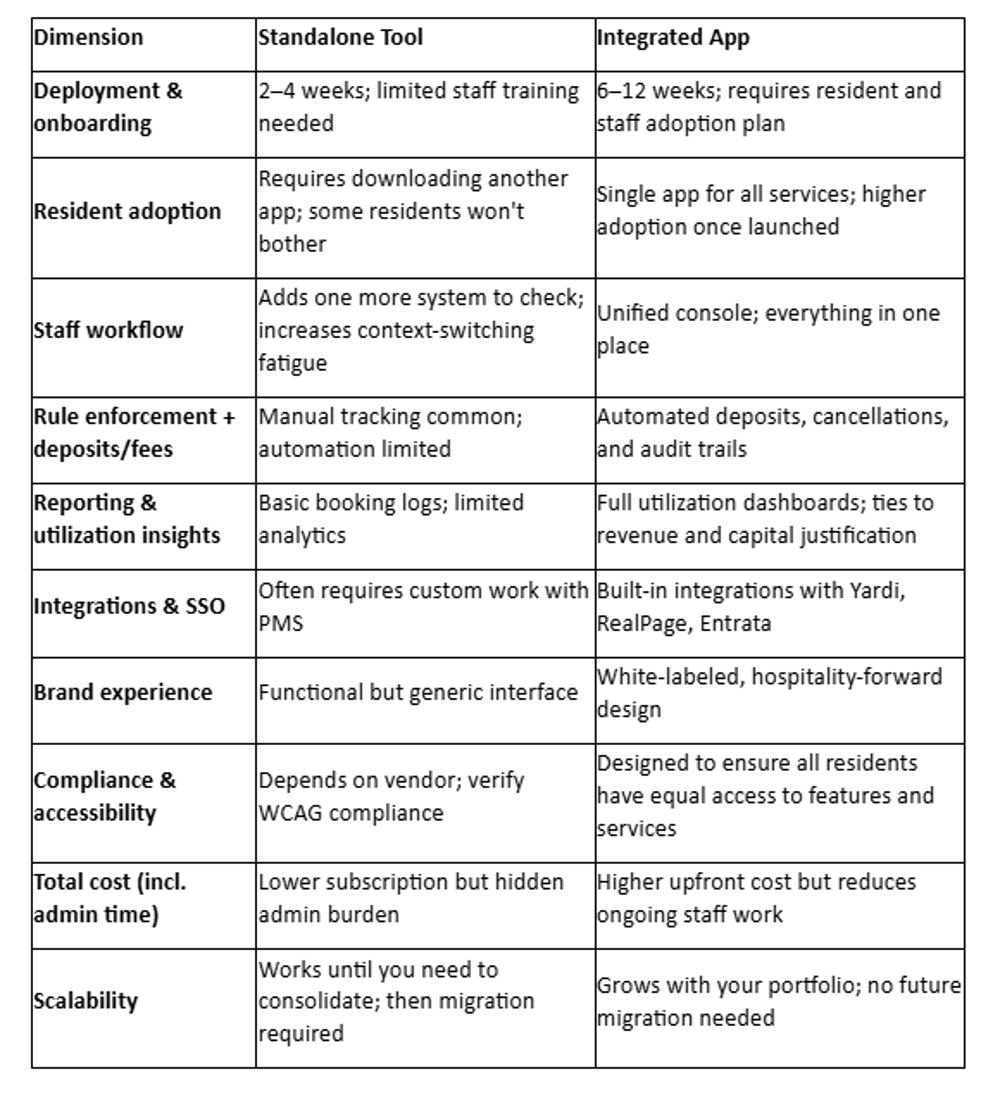
Watch-outs:
- Standalone tools can fix immediate problems but often create data silos that limit reporting and revenue control.
- Integrated apps demand change management and broader stakeholder buy-in, but they eliminate fragmentation and support long-term growth.
7 Questions to Choose the Right Path
Use these questions to guide your decision. Each one reveals whether fragmentation is costing you more than you realize.

1. How many systems or logins does the Property Management Team use for amenity workflows today?
What to check: Count the tools your site team opens to handle amenity reservations, payments, communication, and conflict resolution.
Why it matters: Each additional system increases training time, error risk, and staff turnover impact. The "system toggle tax" compounds quickly in high-turnover environments.
What it implies: If the Property Management Team manages amenities across three or more systems, an integrated app pays for itself through time savings and reduced errors.
2. How often do booking conflicts or rule disputes happen?
What to check: Track double-bookings, policy violations (hours, capacity limits), and resident complaints about unclear availability.
Why it matters: Manual systems cannot enforce rules consistently. Conflicts erode trust, create extra work, and damage the premium experience you're trying to deliver.
What it implies: Frequent conflicts signal the need for automated rule enforcement and real-time visibility—features that integrated platforms handle better than standalone tools.
3. Do you need deposits, fees, and cancellation policies enforced automatically?
What to check: Are you collecting security deposits for party rooms? Charging for late cancellations? Requiring payment upfront for bookings?
Why it matters: Manual deposit tracking creates revenue leakage and administrative burden. Automated systems ensure every booking generates the intended revenue.
What it implies: If monetization is a priority, standalone tools often lack the payment automation and audit trails you need. Integrated apps handle deposits, refunds, and compliance documentation in one workflow.
4. Do you need utilization reporting to justify capital expenditures or programming?
What to check: Can you answer: "Which amenities get used most?" "What times are peak?" "Does this justify the CAPEX we spent on the renovation?"
Why it matters: Executives and investors expect data-driven decisions. Without utilization insights, you're guessing about programming, staffing, and future investments.
What it implies: Standalone tools provide basic booking logs. Integrated platforms deliver dashboards that tie usage to revenue, resident satisfaction, and asset performance—critical for defending budgets.
5. What is staff capacity, and how much training time is realistic?
What to check: Assess current workload, turnover rates, and bandwidth for learning new systems.
Why it matters: High turnover means constant retraining. Complex platforms create adoption risk if the Property Management Team pushes back or reverts to manual workarounds.
What it implies: If capacity is tight, a standalone tool offers a faster path with less disruption. If you have stable leadership willing to champion change, an integrated app becomes the better long-term investment.
6. Are you delivering a Class A hospitality promise that requires seamlessness?
What to check: Does your marketing position the building as luxury, hospitality-forward, or full-service? Do residents expect concierge-level service?
Why it matters: Class A communities command premium rents because of the experience, not just the finishes. Fragmented systems break that promise. Residents expect everything to work in one place, like staying at a five-star hotel.
What it implies: For Class A properties, an integrated Resident App is not optional—it's the technology equivalent of marble countertops and a well-staffed front desk.
7. Will you likely consolidate tools within 12–18 months anyway?
What to check: Review your technology roadmap. Are there plans to unify resident services, reduce vendor count, or improve the digital experience?
Why it matters: If consolidation is inevitable, deploying a standalone tool now means paying twice: once for the tool and again for migration costs later.
What it implies: If your roadmap includes consolidation, skip the interim step and deploy the integrated platform from the start.
Implementation Paths: Choose Your Rollout
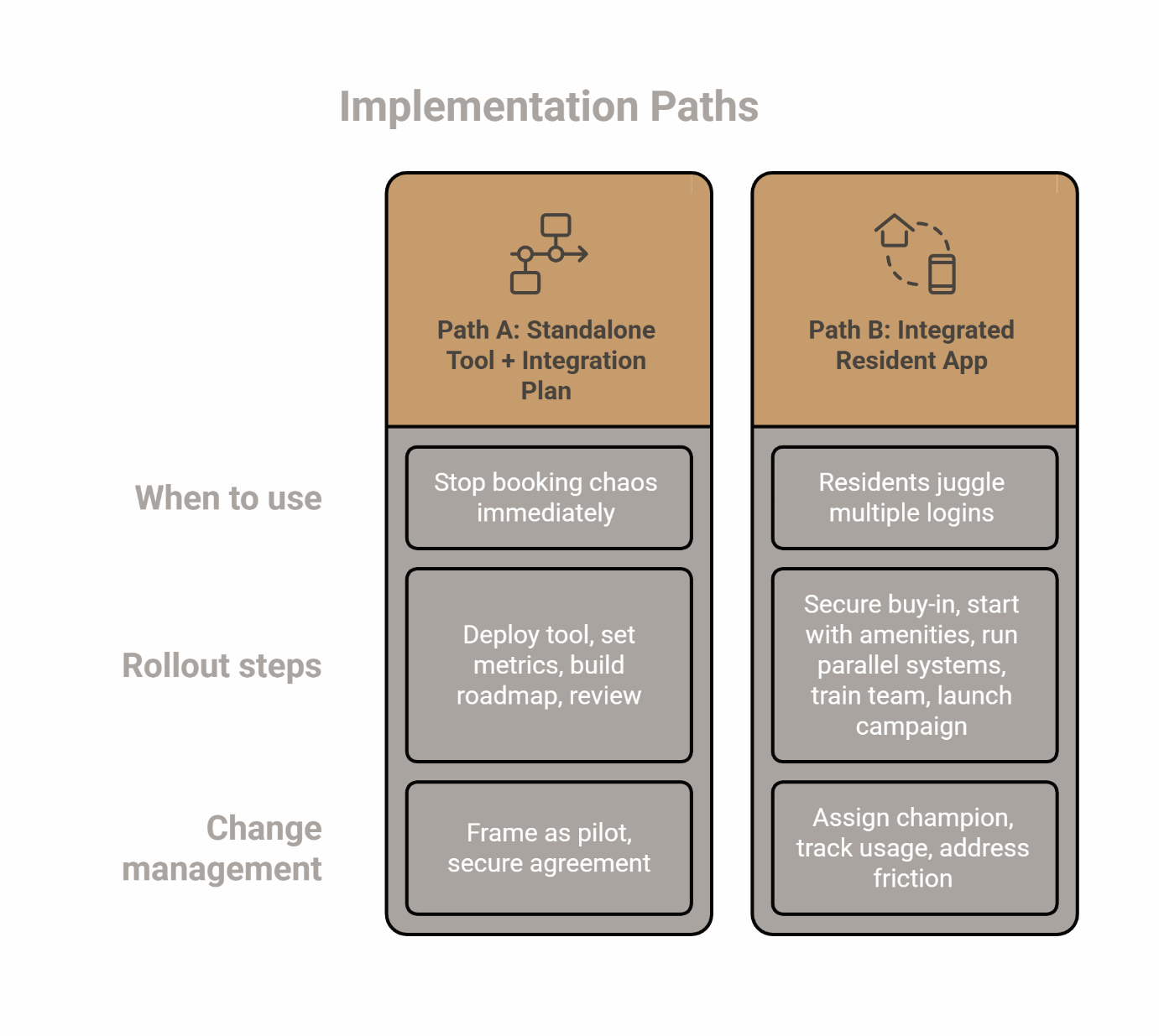
Path A: Start with Standalone Tool + Integration Plan (Phased Approach)
When to use this path: You need to stop booking chaos immediately but aren't ready for a full platform switch.
Rollout steps:
- Deploy standalone tool for the highest-conflict amenity (typically clubhouse or rooftop deck).
- Set clear success metrics: reduction in conflicts, staff time saved, resident satisfaction scores.
- Build integration roadmap with PMS and future platform considerations.
- Schedule 6-month review: evaluate whether silos and admin work justify moving to an integrated app.
Change management: Frame this as a "pilot" with a clear endpoint, not a permanent solution. Secure stakeholder agreement on the conditions that would trigger a platform switch.
Path B: Deploy Integrated Resident App (Platform-First Approach)
When to use this path: Residents already juggle multiple logins, you're monetizing amenities, or your Class A positioning demands seamlessness.
Rollout steps:
- Secure executive and site leadership buy-in with a business case (use the Consolidation Calculator below).
- Start with 1–2 high-value amenities (e.g., clubhouse + rooftop deck) to prove adoption before expanding.
- Run parallel systems for 2–4 weeks during transition; avoid cold cutover.
- Provide hands-on training for the Property Management Team with role-specific workflows (leasing vs. maintenance vs. concierge).
- Launch resident communication campaign 4 weeks before go-live: app benefits, how-to videos, FAQ page.
Change management: Assign an internal champion (property manager or operations lead) to own adoption. Track usage weekly and address friction points immediately.
CRA: Consolidation Calculator (Time + Error + Revenue Leakage)
Use this worksheet to quantify the hidden costs of standalone tools and data silos. Fill in your answers based on current operations—no extensive study required.
Inputs:
- Number of systems the Property Management Team uses for amenity workflows (e.g., PMS portal, standalone booking tool, email for confirmations, spreadsheet for deposits): ___ systems
- Weekly staff minutes spent on manual scheduling, conflict resolution, or correcting errors: ___ minutes/week
- Estimated number of booking conflicts per month (double-bookings, policy violations, unclear availability): ___ conflicts/month
- Are deposits and fees collected digitally with automated tracking and audit trails? ☐ Yes ☐ No
- How important is utilization reporting for defending capital expenditures or programming decisions? ☐ Low (we rarely need this data) ☐ Medium (helpful but not critical) ☐ High (required for CAPEX approval and investment decisions)
Output: Your Consolidation Score
Calculate your score:
- Add 1 point for each system beyond 2.
- Add 1 point for every 30 minutes of weekly manual work.
- Add 1 point for every 3 conflicts per month.
- Add 2 points if deposits/fees are not fully digital.
- Add 2 points if reporting need is "High."
Score interpretation:
- 0–4 points: A standalone tool is likely sufficient for now. Monitor quarterly for changes.
- 5–8 points: Consolidation becomes justified within 12 months. Build an integration or migration plan.
- 9+ points: An integrated platform is justified today. The hidden costs of fragmentation exceed the upfront investment in consolidation.
Top reasons to consolidate (based on your inputs):
- Staff time lost to manual work and system-switching
- Revenue leakage from untracked deposits or missed fees
- Data silos preventing utilization insights and CAPEX justification
Conservative assumptions guidance: This calculator assumes market-rate labor costs and typical amenity usage. For high-turnover sites or Class A communities with premium expectations, the case for consolidation is even stronger.
Vendor Checklist: What to Require in Writing
Before selecting a standalone tool or integrated platform, get these commitments in writing during the RFP or demo process:
Integration & Interoperability
- PMS integration: Direct sync with Yardi, RealPage, Entrata, or your system of record. Confirm data flow: resident roster, unit details, lease status.
- Single sign-on (SSO): Residents and the Property Management Team should not manage separate credentials. Verify authentication method.
- API documentation: Request developer access for future custom integrations.
Rule Engine & Policy Enforcement
- Booking limits: Can the system enforce hours of operation, capacity limits, advance notice requirements, and blackout dates?
- Approval workflows: Does it support manager review for high-demand spaces or specific resident groups?
- Cancellation policies: Can you automate refund rules, no-show penalties, and waitlist management?
Deposits, Fees, and Financial Controls
- Automated deposits: Verify the system can collect, hold, and refund security deposits with audit trails.
- Fee structure: Confirm support for flat fees, hourly rates, and percentage-based charges.
- Revenue reporting: Request sample reports showing bookings by amenity, revenue by time period, and outstanding balances.
Accessibility and Equitable Access
- WCAG compliance: Verify the platform meets WCAG 2.2 standards for accessibility.
- Fair housing compliance: Verify that all residents can access the same services, tools, amenities, and features without barriers, in accordance with fair housing requirements. For more context on federal requirements, see the HUD Fair Housing Act overview.
Reporting and Data Export
- Utilization dashboards: Request screenshots of reporting interfaces showing usage by amenity, time, and resident.
- Export capability: Verify you can export raw data to CSV or Excel for custom analysis.
- Audit trail: Confirm the system logs all bookings, cancellations, policy changes, and admin actions.
Implementation, Training, and Support
- Timeline: Get a realistic deployment schedule with milestones and contingency plans.
- Training plan: Confirm onsite or virtual training for the Property Management Team and role-specific documentation.
- Support model: Clarify response times, escalation process, and availability (business hours vs. 24/7).
- Migration assistance: If switching from another system, request data migration support and parallel-run guidance.
Decision Recap and Next Step
Choosing between an integrated Resident App and a standalone amenity tool is not about which technology is "better"—it's about which one fits your current operational reality and strategic goals.
A standalone tool is sufficient when:
- You need to fix one high-conflict amenity immediately.
- Staff capacity for change is limited right now.
- You're managing a smaller portfolio or a building where seamlessness is less critical.
An integrated platform is justified when:
- Residents juggle multiple logins and complain about fragmentation.
- You want to monetize amenities with automated deposits, fees, and audit trails.
- You need utilization data to defend capital investments and programming decisions.
- You're delivering a Class A hospitality experience that demands seamlessness.
- Consolidation is likely within 12–18 months anyway, and you'd rather avoid migration costs.
Take the Next Step
- Use the Consolidation Calculator to quantify the hidden costs of fragmentation in your current operations.
- Schedule a demo to see how an integrated Amenity Management solution handles booking, payments, reporting, and resident experience in one platform.
- Download the vendor checklist and use it during your evaluation to ensure you're getting the features and support you need in writing.
For more context on the broader platform vs. point solution decision, see our Decision Matrix for Resident Experience Platforms.
Frequently Asked Questions
Can I start with a standalone tool and still move to an integrated app later?
Yes. Many property management teams use a standalone tool to address immediate booking chaos, then migrate to an integrated platform as the business case for consolidation strengthens. The key is building a clear roadmap upfront: define the conditions (e.g., usage volume, resident complaints about fragmentation, need for utilization data) that would trigger a platform switch. Schedule a 6-month review to assess whether silos and admin work justify the move.
What's the biggest risk of standalone tools?
The biggest risk is not the subscription cost—it's the administrative friction and the loss of a single source of truth. When booking data, payment records, and utilization insights live in separate systems, the Property Management Team wastes time reconciling information and executives can't get a complete picture of amenity performance. This fragmentation makes it harder to justify capital expenditures, defend programming decisions, or identify revenue opportunities.
What should integration with a PMS cover at minimum?
At minimum, your amenity management solution should sync resident rosters, unit details, and lease status with your Property Manager Software. This ensures only current residents can book amenities and prevents manual data entry. Ideally, integration should also include single sign-on (SSO) so residents don't manage separate credentials, and payment reconciliation so fees flow into your accounting system without manual transfers.
How do deposits and fees change the decision?
If you want to collect security deposits for party rooms, charge for late cancellations, or require payment upfront for bookings, automation becomes essential. Manual deposit tracking creates revenue leakage and administrative burden—staff forget to collect, residents dispute charges, and refunds lack clear audit trails. Standalone tools often lack the payment automation and compliance documentation you need. Integrated apps handle deposits, refunds, and audit trails in one workflow, making monetization straightforward.
What does "Class A experience" actually require from technology?
A Class A experience means seamlessness. Residents expect everything to work in one place, like staying at a five-star hotel. They shouldn't toggle between apps for rent, maintenance, and amenities—or worse, call the office to book a grill. The technology should be invisible but powerful, like a well-trained concierge. Fragmented systems break this promise. For luxury communities, an integrated Branded Resident App is not optional—it's the digital equivalent of marble countertops and a well-staffed front desk.
How do I drive staff adoption without slowing operations?
Start small. Launch with 1–2 high-value amenities (clubhouse, rooftop deck) to prove the system works before expanding. Run parallel systems for 2–4 weeks during transition so the Property Management Team has a safety net. Provide hands-on training with role-specific workflows—what leasing agents need is different from what maintenance technicians need. Assign an internal champion (property manager or operations lead) to own adoption, track usage weekly, and address friction points immediately. Celebrate quick wins publicly to build momentum.
What reporting should I demand to justify amenity CAPEX?
Request dashboards that show:
- Utilization by amenity: Which spaces get used most, and which sit empty?
- Peak usage times: When do residents actually book spaces, and does this match staffing?
- Revenue by period: How much income did each amenity generate monthly or quarterly?
- Resident engagement: What percentage of residents actively use amenities?
- Booking-to-cancellation ratio: Are residents showing up, or is there high no-show risk?
These metrics tie usage to revenue, resident satisfaction, and asset performance—critical for defending budgets and informing future investments. For more on activating underused spaces, see our guide on Multifamily Amenity Management: Turning Spaces into Community Hubs.
Disclaimer: This article is for general informational purposes only and does not constitute legal advice. For guidance on fair housing compliance and accessibility obligations, consult qualified counsel.
Our Editorial Process: Our expert team uses AI tools to support the research and writing process and to generate first drafts of this content. Each piece is reviewed and refined by a human editor to ensure accuracy, clarity, and alignment with our brand voice. We only publish content that meets our quality standards.
About the ElevateOS Insights Team
The ElevateOS Insights Team is our dedicated engine for synthesizing complex topics into clear, helpful guides. While our content is thoroughly reviewed for clarity and accuracy, it is for informational purposes and should not replace professional advice.