.avif)

📌 Key Takeaways
Resident portals facilitate payments, but branded apps foster the lifestyle stickiness that secures renewals in Class A communities.
- Experience Trumps Existence: Modern portals include amenity booking and event calendars, but these features function as buried secondary modules rather than optimized native experiences.
- Generic Container vs. Brand Identity: Portal providers offer mobile apps, but residents log into shared interfaces with logo placement—not apps that embody your community's brand.
- Eliminate System Toggle Tax: Consolidating operations, amenities, events, and services into one resident-facing app creates a single source of truth while reducing staff friction across disjointed tools.
- Architecture Drives Engagement: Desktop-first utility checkpoints generate monthly logins for problem-solving; home-screen apps with persistent visibility drive daily interactions for community exploration.
- Implementation Through Sequencing: Thirty-day rollouts succeed by activating 2-3 high-impact workflows first—typically package notifications, amenity booking, and resident communication—rather than attempting full migration simultaneously.
Portals process rent; apps shape how residents live.
Property owners and management teams evaluating resident engagement platforms will gain strategic clarity here, preparing them for the detailed feature comparison and implementation guide that follows.
The login screen loads. You type your resident ID. You pay rent, submit a maintenance request, check package notifications. Then you log out, close the browser, and return to juggling three other apps—amenity reservations in one, community events in another, and building updates lost in your email.
Sound familiar?
That's the resident portal experience: a transaction layer that handles the basics—rent payments, service requests, account access—but stops there. For property owners and developers managing Class A communities, these transactional limitations create a friction point: they facilitate payments but fail to foster the lifestyle stickiness that secures renewals.
A Branded Resident App changes the equation by creating an experience layer. It consolidates operations, amenities, events, and services into a single interface that lives on your residents' home screens—not buried in a browser bookmark. The result: higher engagement, streamlined operations for your team, and new revenue opportunities from lifestyle services and amenity bookings that portals simply can't capture.
What a Resident Portal Is Built to Do (and Why It Feels "Fine")
A resident portal is primarily designed as a desktop-first utility for essential property management tasks. Residents log in to pay rent, submit maintenance requests, review lease documents, and receive basic property announcements. For operations teams, it's a straightforward extension of the property management system (PMS).
When a portal works well:
- Your community has straightforward operational needs
- Residents primarily need rent payment and maintenance request capabilities
- Experience expectations remain modest, focused on access rather than engagement
Portals handle the essentials reliably. While many modern portals have added features like amenity booking or bulletin boards, these tools are often buried within a browser-based architecture designed for desktop use. This structure creates a "utility checkpoint" experience: residents log in to solve a problem, not to explore the community.
What a Branded App Changes: From Transactions to Daily Living
A Branded Resident App shifts the foundation. Instead of a login-and-logout portal experience, residents access a branded, home-screen application that consolidates every touchpoint—rent, requests, amenities, events, services, local perks, and community communication—into one intuitive interface.
While many portal providers now offer mobile apps, they are typically generic "container" apps used by thousands of properties. Residents log in to a shared interface that happens to have your logo, rather than opening an app that is your brand.
This shift reflects a general principle in digital adoption: reducing friction increases participation. When a tool is easy to find (home screen), easy to open (biometric login), and consistent (one interface), it gets used more often. That increased frequency creates room for experience-building features that portals usually don't emphasize.
Three structural differences:
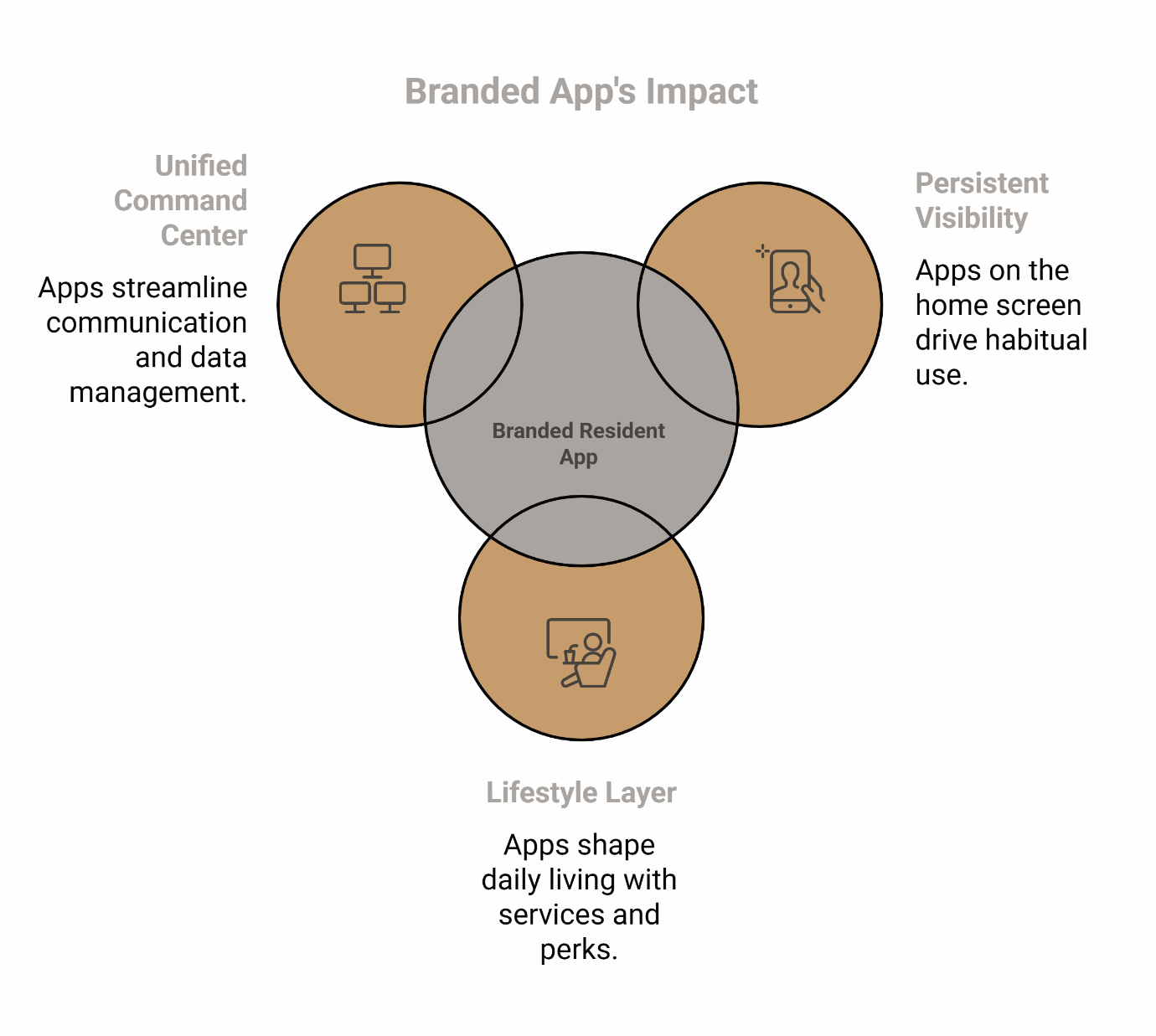
1. Persistent Visibility (The Home Screen Advantage)
Apps live on the home screen, not in a browser or generic container app. This persistent visibility drives habitual use. Residents open the app to book the gym, RSVP for an event, or check delivery notifications—creating multiple daily interactions instead of monthly logins.
2. The Lifestyle Layer
Portals process transactions. Branded apps shape daily living. Residents can reserve the rooftop lounge, sign up for fitness classes, book housekeeping services, access local business discounts, and engage with community groups—all from the same interface where they pay rent.
3. Unified Command Center
Instead of managing resident communications across email, a resident portal, an amenity booking system, an event platform, and a package notification tool, your Management Portal connects to one resident-facing app. This eliminates the "system toggle tax"—the friction of bouncing between disjointed tools—while creating a single source of truth for amenity utilization data.
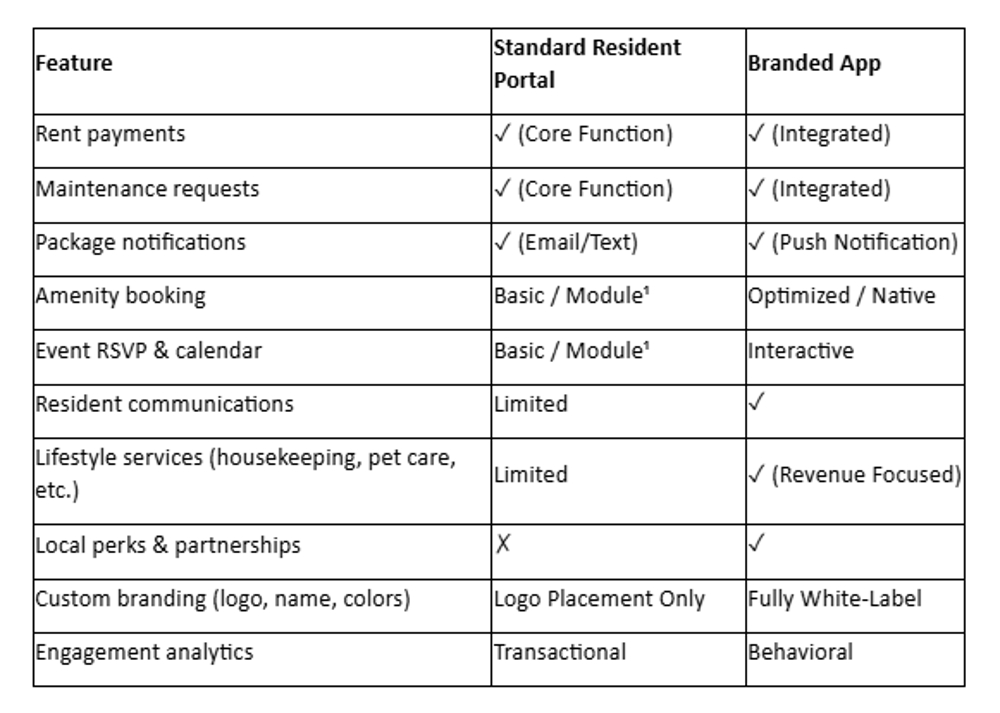
Portal vs. Branded App: Feature Gap Analysis
Experience vs. Existence
What this means for property owners:
The distinction isn't whether features exist—it's how residents experience them. Where portals treat amenities and events as add-on modules, branded apps position them as core elements of daily living. This architectural difference drives the "living well" experience that justifies premium rents and reduces turnover.
Pros and Cons: Be Objective, But Clear
Resident Portal
Pros:
- Simple, familiar interface for basic tasks
- Often included with your PMS at no additional cost
- Handles rent, requests, and essential account access reliably
Cons:
- Fragmented experience: residents juggle multiple logins for amenities, events, and services
- Low engagement: residents log in monthly to pay rent, then leave
- Limited monetization: no infrastructure for lifestyle services or ancillary revenue
- Generic branding: shared interface with logo placement doesn't create brand distinction
Branded Resident App
Pros:
- Consolidates operations, amenities, events, and services into one branded interface
- Home-screen presence drives daily engagement, not just monthly logins
- Enables lifestyle service revenue (monetizing bookable assets like guest suites, clubhouses, or housekeeping services through a seamless mobile interface)
- Reinforces brand identity with custom logo, colors, and name
- Provides actionable engagement data for property teams
Cons:
- Requires change management: residents and staff need to adopt the new tool
- Implementation planning: rollout coordination, training, and communication strategy
- Investment beyond basic PMS costs
- Value depends on activation: features must be configured, promoted, and supported consistently
Important note: While branded apps create opportunities for improved engagement and operational efficiency, outcomes depend on implementation quality, staff training, and consistent operational follow-through. Technology alone doesn't guarantee results.
When a Portal Is Enough—and When It's Time to Upgrade
A portal may be sufficient if:
- Your residents only need rent payments and service requests
- Your community offers minimal amenity programming or lifestyle services
- Experience expectations are primarily operational
It's time to upgrade to a branded app if:
- Residents complain about juggling multiple logins or clunky systems
- You're losing amenity revenue because booking is too complicated
- You want to reduce the number of resident-facing tools your team manages
- You're positioning your community as a Class A, experience-led asset
- Retention and resident satisfaction are strategic priorities
For more on how amenity activation drives engagement, see Multifamily Amenity Management: Turning Spaces into Community Hubs.
What to Look for in a Branded App

Branding control
Confirm you can customize the app's name, logo, and color scheme to match your community's identity. Generic white-label interfaces dilute brand consistency.
Consolidation capability
Ask how many existing tools (portal, amenity booking, event platform, package notifications) the app can replace. The goal is to reduce complexity, not add another login.
Amenity booking and workflow clarity
Amenity booking is more than just a calendar—it involves capacity rules, fair access policies, visibility, and staff operations. Features should support consistent access for all residents, aligned with fair housing expectations.
Operational practicality for site teams
If your property management team can't run it easily, residents will feel that friction. Look for simplicity: clear workflows, straightforward training, and tools that reduce back-and-forth.
PMS integration as a verification step
Integration with your property management system should be verified during evaluation, not assumed. Confirm compatibility early to ensure seamless data flow and prevent duplicate entry.
Implementation Reality for Small Teams
Rolling out a new resident app doesn't require months of planning. Start with a focused, 30-day launch strategy built around sequencing, not attempting to activate everything at once.
Week 1: Pick 2–3 launch workflows
Focus on the highest-impact features first—typically package notifications, amenity booking, and resident communication. Don't try to migrate everything simultaneously.
Week 2: Train the management team
Give your site staff simple scripts for promoting the app during tours, move-ins, and resident interactions. Example: "Everything you need—rent, requests, amenity booking—is in one app now. Let me show you how to download it."
Provide clear guidance on how to handle exceptions and route questions, ensuring the team feels confident supporting residents.
Weeks 3–4: Promote adoption with consistent messaging
Use in-lobby signage, move-in packets, email campaigns, and text reminders. Residents adopt new tools when the value is clear and access is easy.
Operational note: When promoting events, amenities, and services, ensure language presents features as available to all residents under the same rules. Equal access should be built into operational workflows from day one.
For a deeper look at service-driven engagement, see The ROI of Human-Powered Hospitality: Beyond the Tech Stack.
Paying Rent Is Table Stakes—Living Well Is the Differentiator
A portal handles rent. A Branded Resident App shapes how residents experience your community every day. When you consolidate operations, amenities, events, and services into one branded interface, you create the kind of seamless, engaging experience that justifies premium rents and drives long-term retention.
If you're ready to move beyond transactional access and build a branded experience that actually drives engagement, explore what a Resident App can do—or subscribe to our newsletter for practical operating guidance and resident experience insights delivered regularly.
When you're ready to see it in action, schedule a demo or contact us to explore how a unified resident app platform can simplify operations and unlock new revenue opportunities.
Our Editorial Process
Our expert team uses AI tools to help organize and structure our initial drafts. Every piece is then extensively rewritten, fact-checked, and enriched with first-hand insights and experiences by expert humans on our Insights Team to ensure accuracy and clarity.
By: The ElevateOS Insights Team
The ElevateOS Insights Team is our dedicated engine for synthesizing complex topics into clear, helpful guides. While our content is thoroughly reviewed for clarity and accuracy, it is for informational purposes and should not replace professional advice.
Disclaimer: This article is for informational purposes only and should not replace professional advice. Property owners and developers should evaluate their specific operational needs and consult with qualified professionals when selecting resident engagement platforms.