.avif)

📌 Key Takeaways
Clubhouse booking automation eliminates scheduling conflicts by replacing manual coordination with self-serve digital workflows that enforce consistent rules automatically.
- Written Rules Prevent Arguments: Documented policies that define booking windows, duration limits, and consequences remove subjective staff decisions and perceived favoritism.
- Self-Service Drives Adoption: Residents use systems that are simpler than emailing the office—real-time availability, instant confirmation, and one-step payment capture guarantee uptake.
- Deposits Shape Behavior Without Staff Work: Automated collection at booking reduces no-shows and protects assets while eliminating manual payment chasing.
- Utilization Data Enables Optimization: Tracking peak demand, underused slots, and revenue performance transforms amenity management from reactive firefighting into strategic decision-making.
- Fair Housing Requires Uniform Access: The same booking limits, deposit amounts, and cancellation policies must apply to every resident to ensure legal compliance and trust.
Clear rules plus automation equals fewer disputes and measurable revenue.
Property managers and operations teams at Class A multifamily communities will gain immediately implementable workflows here, preparing them for the seven-step framework and copy-paste template that follow.
Multifamily amenity management is the digital process of scheduling, managing, and monetizing shared community spaces—functioning like an OpenTable reservation system, but exclusive to your building's amenities. When implemented correctly, it removes the gray areas that create conflict, automates the enforcement of rules, and turns underutilized spaces into consistent revenue centers.
3:47 PM. The phone rings. Again.
It's the resident from 804—again—asking if the clubhouse is actually available Saturday night because the calendar on the bulletin board shows a penciled-in "maybe" and someone else just told them it's open. Meanwhile, the resident who penciled in that "maybe" three weeks ago never confirmed, never paid, and isn't answering emails.
The leasing manager is stuck playing referee. The clubhouse sits unused half the time. And when it is used, there's no record of who did what or whether anyone actually paid the deposit.
In Class A communities, that pattern damages the luxury experience residents expect. It also drains site-level time and attention that should be spent on higher-value resident service.
This guide walks you through the seven steps to automate clubhouse bookings, eliminate scheduling conflicts, and create a system that protects both your asset and your residents' experience.
Why clubhouse bookings create conflict (and why manual calendars fail)
Manual scheduling systems—paper sign-up sheets, shared spreadsheets, or "just email the office"—create three predictable problems:

Double-bookings and soft holds. When there's no single source of truth, residents pencil in tentative dates, hold multiple slots "just in case," or claim they "called dibs" weeks ago. Staff spend hours arbitrating who has priority.
Unclear or inconsistent rules. Without documented policies, every booking becomes a negotiation. Can residents invite 50 guests? Is there a noise curfew? What happens if someone cancels the day before? When rules are ambiguous, staff make judgment calls—and residents perceive favoritism.
No accountability trail. Paper calendars don't track who approved what, when deposits were collected, or whether spaces were returned in acceptable condition. When damage occurs or complaints arise, there's no audit trail to resolve disputes fairly.
The cost isn't just staff time. It's resident satisfaction. When booking a shared space feels like navigating bureaucracy, residents stop using amenities altogether—or worse, they use competitors' buildings that make it easier.
What "automated clubhouse bookings" means in practice
An automated amenity booking system replaces manual coordination with a self-serve digital process. Residents check availability, submit requests, pay deposits, and receive confirmations—all without involving the front desk.
The system enforces pre-programmed rules automatically: booking windows, time limits, guest caps, required deposits, and cancellation deadlines. If a rule says "maximum 4-hour slots" or "no bookings within 48 hours of the event," the software simply won't allow exceptions unless staff manually override them.
This creates a repeatable operational workflow—clear inputs, clear outputs, and consistent enforcement. The result is a neutral "referee" that treats all residents the same way, reduces staff decision-making fatigue, and creates a permanent record of every transaction.
Management gains visibility into utilization patterns, revenue performance, and compliance with community policies. Automation doesn't mean removing human judgment—it means reserving staff time for genuine exceptions while letting the system handle routine requests consistently.
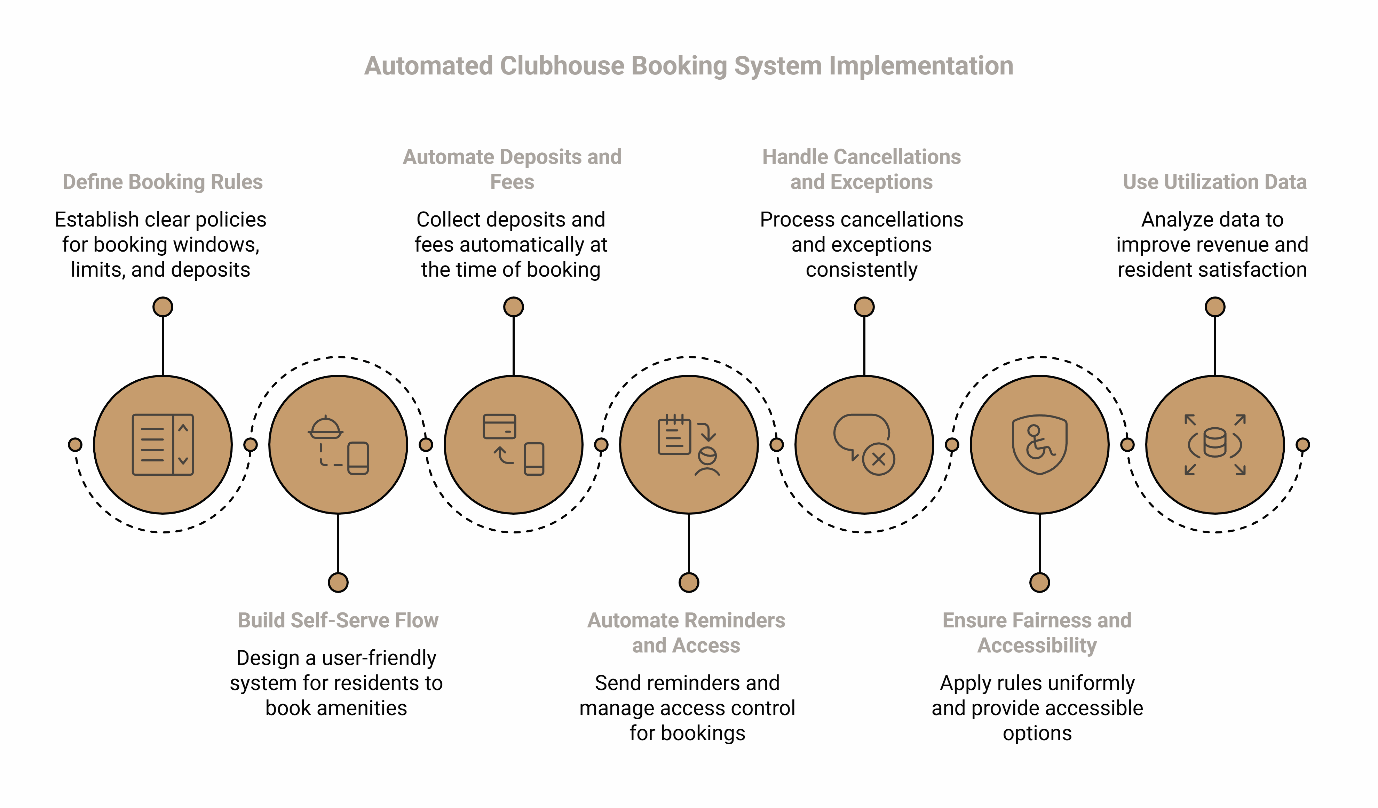
Step 1: Write booking rules that eliminate ambiguity
Before configuring any software, document the policies that the system will enforce. Clear rules prevent arguments before they start. Automation only works when rules are unambiguous—when you convert "common sense" into programmable policy.
Define the booking window. How far in advance can residents book? A 90-day window prevents year-long "land grabs" while giving residents enough planning time for events. Specify whether weekends book faster and whether there's a minimum advance notice (e.g., 48 hours).
Set frequency and duration limits. Decide whether a single resident can book multiple dates per month or per quarter. Limit individual reservations to a maximum duration—typically 4 to 6 hours—to maximize availability for all residents.
Establish capacity and guest policies. State the maximum number of attendees and whether non-residents are allowed. If guests are permitted, specify limits (e.g., "residents may invite up to 10 guests").
Clarify hours and noise boundaries. Align clubhouse hours with community quiet hours. If your lease specifies quiet hours starting at 10 PM, the clubhouse should close by 9:30 PM to allow for cleanup and transition.
Document consequences for violations. What happens if a resident exceeds the guest limit, leaves the space damaged, or creates a noise complaint? Define a progressive enforcement path (e.g., warning, temporary booking suspension, deposit forfeiture).
These rules become the foundation of your automation. The more specific they are, the fewer subjective decisions staff will face.
Step 2: Build a self-serve booking flow residents will actually use
A booking system only works if residents actually use it. Design the flow to be simpler than emailing the office—because a system that residents avoid becomes a system staff must manage manually.
Centralize availability in one place. Residents should see real-time availability on a calendar—no need to call, email, or check a bulletin board. The system should show which dates are open, pending, or confirmed.
Make rules transparent at the point of booking. Display policies directly on the booking screen: "Maximum 4 hours," "No events after 9:30 PM," "$100 deposit required." When rules are visible upfront, residents self-screen and submit compliant requests.
Provide instant confirmation (or clear approval timelines). For straightforward bookings, confirmation should be immediate. If your process requires staff approval (e.g., for large events), set expectations: "Your request will be reviewed within 24 hours."
Eliminate friction points. If residents must submit a request, then email a deposit check, then call to confirm receipt, they'll revert to calling the office. The entire process—request, payment, confirmation—should happen in one digital workflow.
The goal is to make self-service easier than asking for help. When the path of least resistance is the automated system, adoption follows naturally.
Step 3: Add deposits, fees, and accountability without staff chasing payments
Deposits and fees serve two purposes: they protect the asset and shape behavior. Requiring a deposit ensures residents take the booking seriously, reducing no-shows and encouraging proper cleanup.
Set deposit amounts based on risk. A $100 to $250 deposit is standard for clubhouse rentals. The amount should be high enough to matter but not so high that it discourages use. Clearly state what triggers forfeiture: damage, excessive mess, noise violations, or failure to vacate on time.
Automate deposit collection at the time of booking. The system should collect the deposit immediately—via credit card, ACH, or integration with your property management software. Manual collection (e.g., "bring a check to the office") creates delays and incomplete records.
Clarify refund timelines. Specify when deposits are returned (e.g., "within 5 business days if the space is returned in acceptable condition") and the inspection process. Transparency reduces disputes.
Consider usage fees for revenue. Some communities charge a flat rental fee (e.g., $50 for residents, $150 for exclusive private reservations) in addition to the deposit. If you implement fees, ensure they're applied consistently and comply with your lease terms and local regulations.
The key is consistency. When every booking follows the same deposit and fee structure, residents perceive the process as fair—and staff aren't stuck deciding case-by-case exceptions.
Step 4: Automate reminders, access, and day-of logistics
Automation reduces no-shows and ensures smooth transitions between bookings. Many disputes happen on the day of the booking: residents arrive early, show up late, or misunderstand setup/cleanup expectations.
Send confirmation and reminder emails. After a booking is confirmed, send an immediate confirmation with event details, rules, and access instructions. Follow up with a reminder 48 hours before the event and a final reminder the morning of.
Standardize check-in and check-out expectations. Include a checklist in the confirmation: "Arrive no earlier than your reservation start time. Vacate by your end time. Return furniture to original layout. Dispose of trash in designated bins. Report any damage immediately."
Automate access control where possible. If your building uses smart locks or access control systems, program temporary access for the reservation window. Residents unlock the clubhouse with their app or fob only during their reserved time—no key pickup, no front desk coordination.
Set cleaning and damage reporting protocols. Specify post-event expectations: "Wipe down surfaces. Stack chairs. Report spills or broken items." If your community provides event cleanup as a service, include opt-in details in the confirmation.
The goal is to make the resident's responsibilities crystal clear while reducing the number of manual touchpoints staff must manage.
Step 5: Handle cancellations, no-shows, and exceptions the same way every time
Cancellation policies protect availability for other residents and discourage last-minute changes. This is where booking systems either reduce conflict—or become another argument.
Define the cancellation window. A 72-hour cancellation window is common. If a resident cancels within that window, the deposit may be partially or fully forfeited. If they cancel earlier, the deposit is refunded in full.
Automate the cancellation process. Residents should be able to cancel their own bookings through the same system they used to book. The system should immediately release the date, process any deposit refund or forfeiture, and notify the waitlist (if applicable).
Create a waitlist for high-demand dates. If a date is fully booked, allow residents to join a waitlist. When a cancellation occurs, the system automatically notifies the next person in line.
Document staff override authority. There will be legitimate reasons to override bookings—community events, emergency maintenance, or accommodation requests. Specify who has override authority and require documentation (e.g., "Community manager may override for annual resident appreciation event with 14 days' notice").
Consistency is the key to fairness. When every cancellation follows the same logic, residents trust the system—even when they don't get their first-choice date.
Step 6: Make the system fair, accessible, and consistent for all residents
Federal and state fair housing laws require equal access to amenities. Your booking system must ensure all residents can participate.
Apply rules uniformly. The same booking limits, deposit amounts, and cancellation policies must apply to every resident. Inconsistent enforcement—even with good intentions—creates legal risk and erodes trust.
Provide accessible booking options. If your system is app-based or web-based, ensure it meets accessibility standards (e.g., screen reader compatibility, keyboard navigation). Offer alternative booking methods (phone, email, in-person) for residents who need support.
Accommodate documented needs. If a resident requests a reasonable accommodation (e.g., extended time for setup due to mobility limitations), work with them to adjust policies without compromising fairness to others. Document accommodations and apply them consistently for similar requests.
Communicate policies clearly and in multiple formats. Post booking rules in the clubhouse, include them in move-in packets, and make them available in your resident app. Ensure policies are available in accessible formats and translated if your community has non-English-speaking residents.
For U.S. operators, fair housing and accessibility obligations are addressed through established federal frameworks and guidance, including the Fair Housing Act and ADA-related standards and regulations.[1][2][3] Industry resources from organizations like the National Multifamily Housing Council also provide practical guidance on housing provider practices.[4]
A fair system is one where the rules are clear, applied consistently, and designed to serve all residents equally.
Step 7: Use utilization data to improve revenue and resident satisfaction
An automated system generates data you can't get from a paper calendar. Leverage it for operational decisions.
Identify peak demand and adjust pricing or rules. If Saturday nights book out months in advance but weekday afternoons sit empty, consider dynamic pricing (higher fees for peak times) or adjusted booking windows (e.g., Saturday bookings open 60 days out, weekdays 90 days out).
Spot underutilized time slots. If the clubhouse is empty every Tuesday and Thursday evening, use that insight to launch targeted programming (e.g., fitness classes, resident mixers) or offer discounted rentals to drive usage.
Track revenue performance. Calculate monthly income from clubhouse rentals and compare it to your operating costs. A well-utilized clubhouse can generate $1,500 to $3,000+ per month in ancillary revenue—enough to offset utilities, cleaning, and maintenance.
Monitor rule violations and adjust policies. If no-shows are frequent, tighten the cancellation window or increase the deposit. If damage is rare, consider lowering the deposit to encourage more bookings.
Survey residents for feedback. Combine utilization data with resident satisfaction surveys. Are residents happy with the booking process? Are there barriers preventing use? Data tells you what is happening; resident feedback tells you why.
Utilization data transforms amenity management from reactive firefighting to proactive optimization. For a deeper look at using data to drive decisions, see our guide on multifamily amenity management.
Clubhouse booking rules template (copy/paste)
Use this template as a starting point for your community's booking policies. Customize based on your building's needs, lease terms, and local regulations.
Eligibility and Booking Limits
- All residents in good standing may book the clubhouse.
- Residents may book a maximum of [2] dates per [calendar quarter].
- Bookings open [90] days in advance.
- Minimum advance notice: [48] hours.
Hours and Duration
- Clubhouse hours: [9:00 AM to 9:30 PM, 7 days per week].
- Maximum reservation duration: [4] hours per booking.
- All events must conclude and spaces must be vacated by [9:30 PM] to comply with community quiet hours.
Capacity and Guest Policy
- Maximum occupancy: [50] people.
- Residents may invite up to [10] non-resident guests.
- The resident hosting the event is responsible for guest conduct.
Deposits and Fees
- Refundable deposit: $[150], due at time of booking.
- Rental fee (if applicable): $[50] for residents; $[150] for private/exclusive events.
- Deposits will be refunded within [5] business days if the space is returned in acceptable condition.
Cancellation Window and No-Show Policy
- Cancellations made more than [72] hours in advance: full deposit refund.
- Cancellations made within [72] hours: deposit forfeited.
- No-shows: deposit forfeited and potential suspension of booking privileges.
Cleaning and Damage Expectations
- Return furniture to original layout.
- Dispose of all trash in designated bins.
- Wipe down tables and countertops.
- Report any damage immediately to [management email/phone].
- Excessive mess or damage may result in forfeiture of deposit and additional charges.
Noise and Quiet Hours
- All events must comply with community quiet hours ([10:00 PM to 8:00 AM]).
- Outdoor noise must be minimized after [8:00 PM].
- Violations may result in deposit forfeiture and loss of booking privileges.
Enforcement and Escalation
- First violation: written warning.
- Second violation: temporary suspension of booking privileges ([30] days).
- Third violation: permanent suspension of booking privileges and potential lease violation.
Accessibility and Accommodations
- Residents requiring reasonable accommodations should contact [management contact] to discuss adjustments to booking procedures.
- All requests will be reviewed and accommodated in compliance with fair housing requirements.
FAQ
Do I need to charge for clubhouse bookings?
Not necessarily. Some communities use deposits only (to ensure accountability) and waive rental fees to encourage use. Others charge modest fees ($25–$75 for residents) to offset operating costs and reduce frivolous bookings. The decision depends on your goals: maximizing utilization, generating ancillary revenue, or both. Just ensure any fee structure is applied consistently to all residents.
How do I prevent double-booking and "holds"?
Use a digital system that shows real-time availability and locks dates immediately upon confirmation. Disable "pending" statuses that allow residents to hold multiple dates without committing. If your process requires staff approval, set a defined review timeline (e.g., 24 hours) and auto-release unconfirmed requests.
What is a reasonable deposit and cancellation window?
A $100 to $250 deposit is standard for clubhouse rentals. The amount should be meaningful enough to discourage no-shows but not so high that it prevents use. A 72-hour cancellation window balances fairness (giving residents flexibility) with protecting availability (discouraging last-minute changes). Adjust based on your community's patterns—if no-shows are frequent, tighten the window; if rare, you can be more lenient.
Can staff override bookings for community events?
Yes, but document the process. Designate who has override authority (typically the community manager or regional manager) and require advance notice (e.g., 14 days for planned events, immediate for emergencies like maintenance). Log every override to maintain transparency and avoid perceptions of favoritism.
How do I handle accessibility accommodations?
Fair housing laws require reasonable accommodations for residents with disabilities. If a resident requests extended setup time, accessible furniture arrangements, or alternative booking methods, work with them to adjust policies without creating undue burden. Document accommodations and apply them consistently for similar requests. When in doubt, consult legal counsel to ensure compliance.
Related Resources
For more strategies on optimizing amenity spaces and driving revenue, explore these guides:
- Automating amenity reservations: A step-by-step guide for maximizing NOI
- Multifamily amenity management: Turning spaces into community hubs
- Ancillary revenue 101: Monetizing shared spaces effectively
- Active vs. passive amenity management: What is the difference?
- How to activate your clubhouse without hiring more staff
Disclaimer: This guide provides general information on amenity booking systems for multifamily properties. It is not legal, financial, or operational advice. Booking policies must comply with your lease agreements, local regulations, and fair housing laws. Consult with legal counsel before implementing deposit structures, cancellation policies, or enforcement procedures.
Our Editorial Process: Articles are developed using industry research, proprietary operational data, and insights from communities using modern property management systems. Content is reviewed for accuracy and practical applicability.
About the ElevateOS Insights Team
The ElevateOS Insights Team is our dedicated engine for synthesizing complex topics into clear, helpful guides. While our content is thoroughly reviewed for clarity and accuracy, it is for informational purposes and should not replace professional advice.
External References
[1] HUD Exchange — Fair Housing and Civil Rights Laws, Guidance, and Tools
[2] ADA.gov — ADA Standards for Accessible Design