.avif)
Multifamily Operations
Multifamily Shift Log Software: How Apartment Teams Improve Staff Handoffs and Resident Service
Multifamily shift log software gives property teams one organized place to document daily activity, communicate between shifts, assign follow-ups, and preserve important operational context. The result is fewer missed tasks, more consistent resident service, and a clearer record of what happened throughout the day.
Quick answer: Multifamily shift log software is a digital system used by apartment staff to record incidents, resident interactions, package activity, vendor visits, unresolved requests, building conditions, and other daily updates that need to carry from one shift to the next.
What Is Multifamily Shift Log Software?
Multifamily shift log software is a centralized digital workspace where property managers, concierge teams, front-desk employees, maintenance staff, security personnel, and other authorized team members can document what happens during a shift.
It replaces—or significantly improves upon—paper notebooks, informal text chains, scattered emails, spreadsheets, and verbal handoffs. Instead of important information disappearing when one employee leaves for the day, the next team member can review an organized record of recent activity and outstanding responsibilities.
A multifamily shift log may include:
- Resident questions and service interactions
- Open follow-up items
- Package delivery or pickup concerns
- Guest and vendor activity
- Amenity issues or closures
- Building access observations
- Maintenance-related updates
- Noise, cleanliness, or common-area concerns
- Move-in and move-out coordination
- Events that may affect the next shift
The purpose is not simply to create more documentation. The purpose is to make daily operations more dependable by giving every shift the context needed to continue working without starting over.
Why Shift Handoffs Break Down in Apartment Communities
Apartment communities operate beyond traditional office hours. Residents may need assistance in the morning, during the workday, at night, or over the weekend. At larger communities, several employees and departments may interact with the same resident or operational issue.
That makes the staff handoff one of the most important—and most overlooked—parts of multifamily operations.
A resident might speak to the concierge about a package, email the management office about an access problem, mention the issue to a maintenance employee, and then follow up with a weekend team member. Without a shared operational record, each employee sees only part of the story.
Verbal updates are forgotten
Important details may be communicated quickly at the front desk but never documented for employees arriving later.
Information lives in separate channels
Email, texts, paper notes, work orders, and direct messages create fragmented versions of the same issue.
Ownership is unclear
A note may describe a problem without identifying who is expected to handle the next step.
Context disappears between shifts
The next employee sees the unresolved task but does not know what has already been tried or promised.
Follow-ups depend on memory
Even highly attentive employees can miss tasks when the property gets busy or staffing changes unexpectedly.
Managers lack visibility
Leadership cannot easily identify recurring issues when operational details are buried in separate notebooks and inboxes.
What Should an Apartment Shift Log Include?
A useful apartment shift log should give the next employee enough information to understand what happened, what still needs attention, and who owns the next action. Entries should be brief enough to review quickly but detailed enough to prevent confusion.
1. Date, time, and employee
Each entry should clearly show when it was created and who documented it. This makes the sequence of events easier to understand and allows team members to ask the right person for additional context.
2. Location or operational area
The entry should identify the relevant unit, floor, amenity, package room, lobby, parking area, entrance, or other building location.
3. Clear summary
Staff should describe the activity in direct, neutral language. A useful summary explains the operational facts without forcing the next employee to interpret vague shorthand.
4. Action already taken
The log should state whether staff contacted maintenance, notified a manager, spoke with a resident, moved a package, updated an amenity schedule, or completed another step.
5. Required follow-up
Open tasks should be unmistakable. The entry should explain what remains unresolved, when it should be revisited, and which role or team member is responsible.
6. Current status
Simple statuses such as open, monitoring, waiting on resident, waiting on vendor, escalated, and completed make the log easier to scan.
7. Relevant attachments or references
When appropriate, staff may need to reference a related request, communication, document, image, inspection, package record, or maintenance item.
Everything. One App.
Give Every Shift a Clearer View of Daily Property Operations
ElevateOS helps multifamily teams connect staff communication, resident workflows, amenities, packages, services, onboarding, and building operations in one centralized platform.
Schedule a Free DemoHow Multifamily Shift Log Software Improves Daily Operations
Creates continuity between employees
A centralized shift log lets employees see what occurred before they arrived. The morning team can understand what happened overnight, weekday staff can review weekend activity, and managers can monitor issues without depending on a verbal recap.
This continuity is particularly valuable at communities with concierge desks, rotating schedules, multiple maintenance employees, or shared regional support.
Reduces repeated work
Without a clear activity record, multiple employees may investigate the same issue, contact the same vendor, or ask the resident for information that has already been provided.
Shift log software allows each person to see the steps already completed and continue from the correct point.
Prevents open items from disappearing
The busiest moments at an apartment community often produce the most operational risk. A staff member may intend to follow up after helping the next resident, accepting a delivery, answering a call, or coordinating a move-in.
Documenting the item immediately creates a record that remains visible even when priorities change or another employee takes over.
Supports more consistent resident communication
Residents become frustrated when they need to repeat the same story to several employees or receive conflicting answers from different shifts.
A shared log helps staff review prior interactions before responding. The resident experiences one coordinated property team rather than a collection of disconnected departments.
Gives managers better operational visibility
Managers should not need to read every entry individually to gain value from a shift log. Over time, a centralized record can reveal patterns such as:
- Repeated access problems at one entrance
- Recurring package-room congestion
- Amenities generating frequent resident questions
- Vendors that regularly miss scheduled visits
- Tasks that are repeatedly delayed during certain shifts
- Resident communications that need clearer automation
- Processes requiring better ownership or training
These patterns help operators improve the system behind the issue instead of repeatedly addressing individual symptoms.
Apartment Shift Log Software vs. a Paper Logbook
| Capability | Paper Logbook | Digital Shift Log |
|---|---|---|
| Remote visibility | Limited to the physical location | Authorized staff can review updates digitally |
| Searchability | Requires manual page review | Entries can be organized and found more quickly |
| Task ownership | Often implied or handwritten | Follow-up responsibilities can be clearly documented |
| Status visibility | Updates may appear on different pages | Open and completed items are easier to distinguish |
| Management oversight | Manager must be on site to review it | Leadership gains more timely operational visibility |
| Portfolio consistency | Format varies by property and employee | Teams can use a more standardized process |
A paper logbook may still capture basic notes, but it is difficult to search, monitor remotely, standardize across communities, or connect with broader property workflows. Digital software turns the shift log from a passive notebook into an active operational tool.
Which Multifamily Teams Benefit From a Digital Shift Log?
Shift logs are useful anywhere responsibility changes hands during the day. They are especially valuable for the following teams.
Front-desk and concierge teams
The front desk often becomes the central point for resident questions, guests, packages, deliveries, move-ins, vendors, access concerns, and amenity activity. A shared log helps the next employee understand the current state of the lobby and community.
Property management teams
Managers can use daily notes to maintain awareness of resident concerns, recurring service gaps, operational exceptions, and tasks requiring escalation.
Maintenance teams
A shift log can provide useful context around building observations, access coordination, vendor arrival, resident availability, and issues that do not yet require—or have not yet become—a formal work order.
Package-room teams
Employees can record unusual deliveries, resident pickup concerns, storage capacity problems, unidentified items, or packages requiring special attention.
Regional and portfolio leadership
Standardized digital notes help regional leaders understand property-level activity and compare recurring operational patterns across multiple communities.
Shift Logs, Work Orders, and Resident Requests: What Is the Difference?
These tools can support one another, but they serve different operational purposes.
Shift log
Documents the broader story of daily property activity and gives employees context for the next shift.
Work order
Tracks a defined maintenance task that typically requires assignment, completion, and technical documentation.
Resident request
Records a specific need submitted by a resident, such as a service question, amenity issue, or request for assistance.
For example, a shift note might explain that a resident reported an intermittent elevator noise, the team inspected the area, and the issue occurred again later that evening. If technical service is required, the property can then create or reference a formal maintenance task.
The shift log preserves the sequence and context. The work order manages the repair.
Features to Look for in Multifamily Shift Log Software
Simple note creation
Employees should be able to add an update quickly. If the process is cumbersome, staff will postpone documentation or return to informal communication methods.
Chronological activity history
Notes should appear in a clear timeline so employees can understand the order in which events occurred.
Search and filtering
Teams should be able to locate information by date, employee, location, status, category, or other relevant details.
Follow-up visibility
Open items should not look the same as completed informational notes. The software should help staff identify which updates require action.
Role-based access
Teams should be able to provide appropriate visibility based on each employee’s responsibilities. Not every operational entry needs to be visible to every user.
Connections to daily property workflows
A shift log becomes more useful when employees can work within the same broader platform used for packages, amenities, communication, onboarding, requests, inspections, documents, and resident engagement.
Multi-property consistency
Portfolio operators should be able to establish a shared operational standard while still supporting the needs of individual communities.
How to Create a Better Staff Handoff Process
-
Define what belongs in the shift log.
Give employees practical examples so they understand which events should be documented and which belong in another workflow. -
Use consistent categories.
Organize notes around areas such as residents, packages, amenities, visitors, vendors, maintenance, access, move-ins, and building conditions. -
Require a clear next action.
Every unresolved entry should identify what needs to happen and who is expected to act. -
Review the log at the beginning of each shift.
Make the activity review part of the employee’s normal opening routine rather than an optional step. -
Close completed items.
Update the status when the issue is resolved so later employees do not continue unnecessary work. -
Escalate issues into the correct workflow.
Create a formal request, maintenance task, management follow-up, or other record when the situation requires more than a shift note. -
Review patterns regularly.
Managers should look for repeated issues, unclear ownership, and processes that generate avoidable staff work.
How Shift Logs Support Resident Experience
Residents may never see the shift log, but they experience its impact.
When employees have shared operational context, residents are less likely to repeat themselves, receive contradictory answers, or wonder whether anyone is handling their concern. The property appears more organized because the team is working from the same information.
A better staff handoff can lead to:
- Faster and more informed responses
- Fewer missed commitments
- More consistent service across shifts
- Clearer communication during delays
- More coordinated package, guest, and amenity experiences
- Greater confidence in the property team
Resident experience is not created by a single feature or interaction. It is built through hundreds of small operational moments. Shift continuity helps make those moments feel coordinated.
How ElevateOS Supports Connected Daily Operations
ElevateOS helps multifamily communities bring staff communication and resident-facing workflows into one connected community operating system.
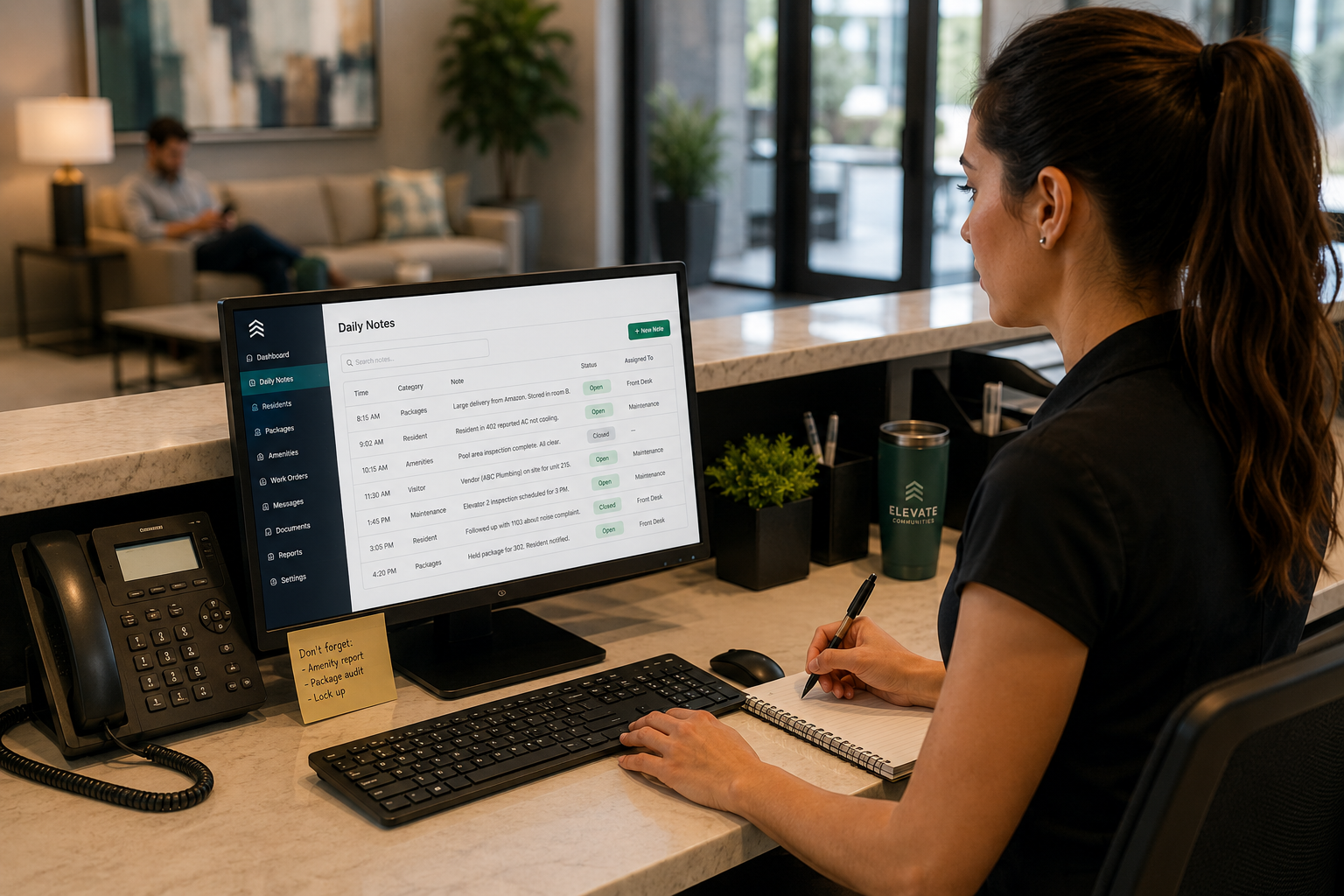
Daily Notes
Help front-desk teams create shift notes, reminders, and operational updates.
Management Portal
Centralize property activity, resident information, amenities, documents, and workflows.
Package Management
Give teams clearer package visibility and a more organized resident pickup experience.
Resident Communication
Keep residents informed through a more centralized and consistent communication experience.
Amenity Operations
Connect reservations, resident access, rules, schedules, and property-team visibility.
Branded Resident App
Give residents one digital destination for services, communication, amenities, and community life.
Frequently Asked Questions
What is multifamily shift log software?
Multifamily shift log software is a digital system that helps apartment employees record daily activity, communicate between shifts, document open items, and maintain operational continuity.
What should apartment staff include in a shift log?
Staff should include the date and time, location, factual summary, actions already taken, current status, required follow-up, and the person or role responsible for the next step.
How is a shift log different from a work order?
A shift log documents daily operational context across the property. A work order manages a specific maintenance task that requires assignment, technical work, and completion.
Can a digital shift log replace a paper front-desk notebook?
Yes. A digital shift log can replace a paper notebook while improving searchability, remote visibility, consistency, task ownership, and access to previous updates.
How does shift log software improve resident service?
It gives employees shared context about previous interactions and open commitments. This reduces repeated questions, inconsistent answers, missed follow-ups, and delays between shifts.
Who uses shift log software at an apartment community?
Property managers, concierge employees, front-desk teams, maintenance staff, package-room employees, security teams, and regional operators may all use or review shift logs depending on their roles.
Can shift logs be used across multiple properties?
Yes. A standardized digital shift log can help portfolio operators create more consistent documentation and handoff practices across multiple apartment communities.
Final Takeaway
The quality of a multifamily community’s daily operations often depends on what happens between shifts.
When information is shared verbally, written in a paper notebook, or scattered across separate communication channels, important context can disappear. Residents repeat themselves, staff duplicate work, open items are missed, and managers have limited visibility into recurring problems.
Multifamily shift log software creates a more reliable handoff. It gives employees one place to document activity, explain what has already happened, identify unresolved tasks, and help the next shift continue without losing momentum.
For residents, that creates a more consistent service experience. For staff, it creates a clearer and more manageable operating rhythm. For multifamily leaders, it provides a stronger foundation for standardization, visibility, and continuous improvement.